pCloud to Cloudflare R2: Cutting Egress Costs Without Losing Versioned File History
Move pCloud archives to Cloudflare R2 ($0.015/GB, $0 egress, 4.995 TiB max object) — keep checksums and folder paths intact via two practical methods.
Introduction
Cloudflare R2 charges $0.015 per GB per month for storage and exactly $0 for egress, which makes it one of the cheapest destinations on the market for media archives, model weights, dataset mirrors, and any asset you read often but rewrite rarely. pCloud, by contrast, is built around a flat-rate consumer model: a 500 GB Premium plan at $4.99 per month, a 2 TB Premium Plus plan at $9.99 per month, and a 10 TB Ultra Lifetime tier at a one-time $1190. The lifetime ceiling is what often pushes pCloud users toward R2 — once you outgrow 10 TB, every extra terabyte on pCloud means another lifetime purchase, while R2 simply meters $15 per TB per month and adds no read fees on top. This guide walks two real ways to move data off pCloud and into an R2 bucket: one that uses pCloud's web download plus the R2 dashboard upload, and one that uses CloudsLinker as a server-to-server bridge driven by pCloud OAuth and the R2 S3 API.
Quick Navigation
About pCloud
pCloud is a Swiss-headquartered consumer cloud storage service launched in 2013, with EU and US data regions selectable at sign-up. Its appeal is the lifetime pricing model — $1190 buys 10 TB of Ultra storage permanently, and 500 GB / 2 TB lifetimes appear regularly on promotional channels — alongside a free tier that starts at 10 GB.
The product is tuned for end-user workflows: a desktop sync client, mobile app, web player for media, and an optional add-on called pCloud Crypto that adds zero-knowledge client-side encryption (the password derives the key, and pCloud cannot recover the data if you lose it). What pCloud is not built for is programmatic, S3-compatible reads at machine speed — that's where Cloudflare R2 takes over.
pCloud features that matter for migration planning
- No per-file upload size cap: Files of any size upload as long as they fit inside your account quota — useful when staging large media or backup archives before sending them onward.
- Trash retention 15–30 days, extendable to 365: Free accounts keep deleted files 15 days, paid accounts 30 days. The Extended File History add-on stretches Trash, file revisions, and Account Rewind to 365 days.
- Shared link traffic, not transfer, is metered: Premium plans include 500 GB/month of public-link bandwidth; Premium Plus includes 2 TB/month. Personal up/downloads through the OAuth-authenticated API or the official client are not capped.
- OAuth API with EU and US auth domains: Third-party tools authenticate against
my.pcloud.com(US) ore.pcloud.com(EU). Region matters: a token issued for the wrong region returns 4xx on every request.
Why people stay on pCloud
pCloud is genuinely good at the consumer job: a single payment unlocks 10 TB for life, the desktop client mounts as a virtual drive, and the web player handles media files without re-encoding. Most migrations to R2 are not about leaving pCloud — they're about offloading the cold half of an account so the warm 2 TB stays on the lifetime plan.
- Lifetime plans up to 10 TB: $1190 one-time for Ultra 10 TB; lower-tier 500 GB and 2 TB lifetimes circulate at lower price points and never re-bill.
- AES encryption at rest, optional zero-knowledge layer: Server-side AES is on by default; pCloud Crypto adds client-side zero-knowledge encryption for a folder where the key never leaves the device.
- No bandwidth throttling on first-party transfer: There is no published daily download cap on personal API or desktop-client traffic, which is what makes a one-shot bulk migration to R2 practical.
About Cloudflare R2
Cloudflare R2 is an S3-compatible object store launched out of beta in 2022 and now the default destination for projects that want predictable storage costs without per-GB egress fees. Storage is metered at $0.015 per GB per month, Class A operations (writes, lists, multipart) at $4.50 per million, Class B (reads, heads) at $0.36 per million, and egress is fixed at $0 across the S3 API, public r2.dev domains, and Workers.
The free tier — 10 GB of storage, 1 million Class A operations, and 10 million Class B operations per month — is generous enough to host small static datasets without ever hitting a bill. Where R2 differs from pCloud is the access model: there is no end-user UI by design. Files arrive via an Account ID, Access Key ID, and Secret Access Key, and downstream apps treat the bucket as an S3 endpoint.
Cloudflare R2 features that shape the migration
- Max object size 4.995 TiB: A single PutObject or completed multipart upload can land 5 TiB minus 5 GiB. Larger files must be split — almost no real-world archive hits the ceiling.
- Zero egress, anywhere: Reads via S3 API, public r2.dev URL, or a Worker incur no per-GB egress. The cost asymmetry vs S3 ($0.09/GB) and B2 ($0.01/GB) is the entire reason most archives migrate to R2.
- S3 API plus jurisdictional buckets: Buckets can be created globally (auto-routed) or pinned to the EU jurisdiction for GDPR-bound data. The S3 endpoint is
https://<account-id>.r2.cloudflarestorage.com. - Storage classes: Standard and Infrequent Access: Standard at $0.015/GB; Infrequent Access at $0.01/GB but with retrieval and minimum-storage-duration costs. Most pCloud → R2 archive moves land in Standard.
Why R2 is the destination of choice for cold archives
- $15 per TB-month flat, no egress invoice: 10 TB of pCloud Ultra spillover sits at $150/month on R2 Standard with unlimited reads — the read budget is the part that breaks every other S3-class quote.
- 1 million free writes per month: The Class A free allowance is enough to seed a multi-TB initial sync within the free tier as long as the file count stays under a million.
- S3-compatible by API, not just by name:
aws s3 cp,rclone,boto3, and any S3 SDK target R2 with a single endpoint override — the same tools you'd use for AWS S3, iDrive e2, Wasabi, or Backblaze B2.
Why move from pCloud to Cloudflare R2?
The migration story is almost entirely about asymmetric workloads: data that is written once and read many times. pCloud was sized for the upload side; R2 was sized for the read side.
- $0.015/GB/month vs pCloud's lifetime ceiling at 10 TB: Once a pCloud account has bought the 10 TB Ultra Lifetime, the only path to more space is another lifetime purchase. Spilling cold tiers into Cloudflare R2 at $0.015/GB-month adds capacity in 1 GB increments and stops the lifetime stack from compounding.
- Zero egress on R2 vs pCloud's metered shared-link traffic: pCloud Premium includes 500 GB/month of public-link traffic; Premium Plus includes 2 TB/month. R2 reads are unmetered through the S3 API, r2.dev domain, and Workers — the only ceiling is the per-million Class B operation count.
- S3-compatible writes from any tool to Cloudflare R2: Migration runners (rclone, AWS CLI, CloudsLinker), backup tools (restic, Duplicati), and pipelines (Airflow, Dagster) all speak S3. R2 takes the same call without code changes — pCloud's REST API requires custom integration.
-
EU jurisdiction option on R2 for GDPR-bound copies of pCloud data: If your pCloud account is on the EU region (
e.pcloud.com), you can pin the destination R2 bucket to the EU jurisdiction at create time. The pair stays inside EU data residency end-to-end.
The trade-off is access model: pCloud gives you a UI and a sync client, R2 gives you an S3 endpoint. Most users solve this by keeping pCloud for the working set and using R2 as the cost-controlled archive tier.
Before you migrate
Three checks save a re-run later. None take more than a few minutes.
-
Decide on R2 jurisdiction at bucket creation: Once a bucket exists, its jurisdiction (default global, optional EU, optional FedRAMP) cannot be changed. Match it to where your pCloud account lives — EU pCloud accounts (
e.pcloud.com) typically pair with the R2 EU jurisdiction. - Audit the pCloud Crypto folder separately: Files inside a pCloud Crypto folder are zero-knowledge encrypted with a password-derived key. CloudsLinker and any other third party can only read these files after they have been mounted with the Crypto password — plan to either decrypt them in place first or skip the Crypto folder.
- Mint a scoped R2 API token, not the global account key: In the Cloudflare dashboard, create an R2 API token bound to a single bucket with the Object Read & Write permission. Avoid using the account-level Global API Key — if it leaks, every Cloudflare service on the account is exposed.
Once jurisdiction, Crypto inventory, and a per-bucket token are settled, both methods below take roughly the same shape.
Two ways to transfer pCloud → Cloudflare R2
The manual method works well when the dataset is small enough to stage locally; the cloud-to-cloud method via CloudsLinker is what scales past a few hundred gigabytes or thousands of small files. Both are described honestly with their real limits.
Method 1: pCloud web download + R2 dashboard upload
1. Download from pCloud
Sign in at my.pcloud.com (US) or e.pcloud.com (EU), select the folder, and choose Download as ZIP. pCloud builds a single archive of the folder; for folders larger than ~20 GB, the desktop sync client is more reliable than the web download because the browser archive job can time out on slow links. There is no published daily download cap on personal traffic.
Set the desktop client to download mode for the folder if web ZIP fails — that bypasses the in-browser archive step entirely.
2. Verify counts and checksums locally
Run find ./staging -type f | wc -l and confirm it matches the file count you saw in pCloud. For high-stakes datasets, generate sha256sum against the staging directory and store the manifest — R2's S3 API will return ETags after upload that you can compare to validate end-to-end integrity.
3. Upload to the R2 bucket
In the Cloudflare dashboard, open the destination R2 bucket and drag the staged folder into the upload pane. The dashboard handles multipart automatically up to the 4.995 TiB max object size. For folders over 50 GB or with more than ~10,000 files, switch to aws s3 cp --recursive or rclone copy against the R2 endpoint https://<account-id>.r2.cloudflarestorage.com — both bypass the dashboard's request-batching limits.
4. Spot-check sample files in R2
Download a handful of files via the S3 API or the bucket's public r2.dev URL and compare them against the originals. Confirm folder paths and filenames survived (encoding issues with CJK or accented filenames are the most common surprise) and that any objects you needed publicly readable have the right object-level visibility set.
Method 2: pCloud → Cloudflare R2 via CloudsLinker (server-to-server)
What CloudsLinker does for this pair
CloudsLinker connects to pCloud through the official OAuth flow at my.pcloud.com or e.pcloud.com and to Cloudflare R2 through the S3 API using an Account ID, Access Key ID, and Secret Access Key. The transfer runs entirely on CloudsLinker's servers — files stream from pCloud's region directly to R2 without staging on your machine. CloudsLinker is a third-party tool that uses pCloud's and Cloudflare's public APIs under your authorization; it has no partnership with either vendor and access can be revoked from each cloud's settings at any time.
1. Connect pCloud (OAuth, region-matched)
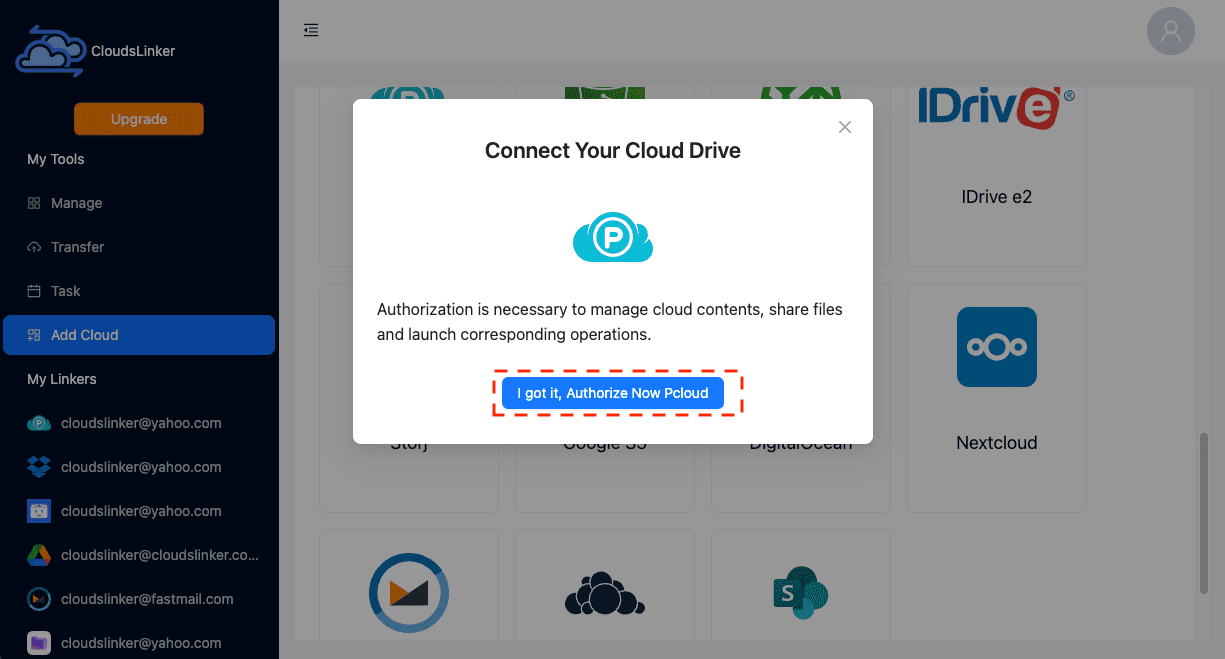
Sign in to CloudsLinker and click Add Cloud → pCloud. Pick the region that matches where your pCloud account was created — US accounts authenticate at my.pcloud.com, EU accounts at e.pcloud.com. A wrong-region token returns errors on every API call. Approve read access on the pCloud OAuth screen; the token is then encrypted at rest by CloudsLinker.
2. Connect Cloudflare R2 (S3 endpoint, scoped token)
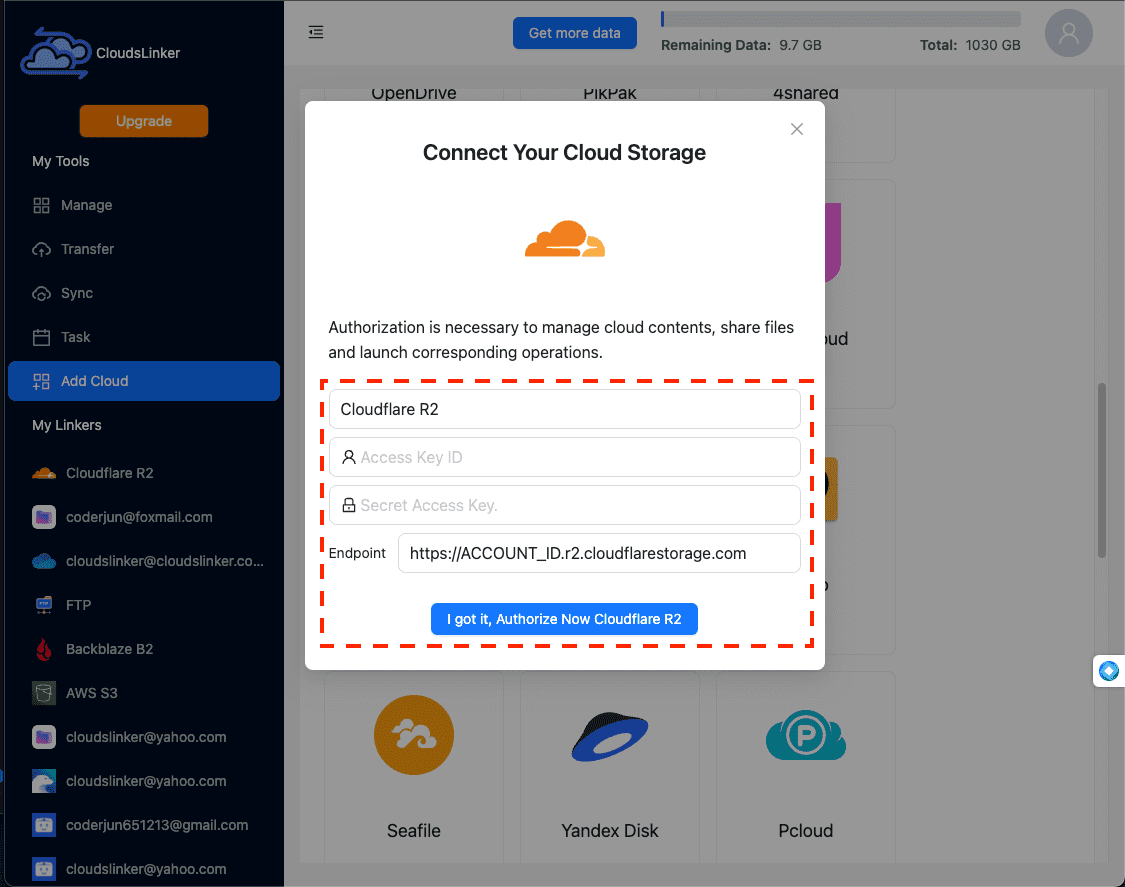
Click Add Cloud → Cloudflare R2. Paste the Account ID from dash.cloudflare.com → R2 → Overview, then the Access Key ID and Secret Access Key from a per-bucket R2 API token with Object Read & Write permission. Do not use the account-wide Global API Key — a scoped token is revocable independently and limits blast radius. CloudsLinker validates the credentials by listing the bucket and surfaces a connection-ready state on success.
3. Configure source folder, R2 bucket, and prefix
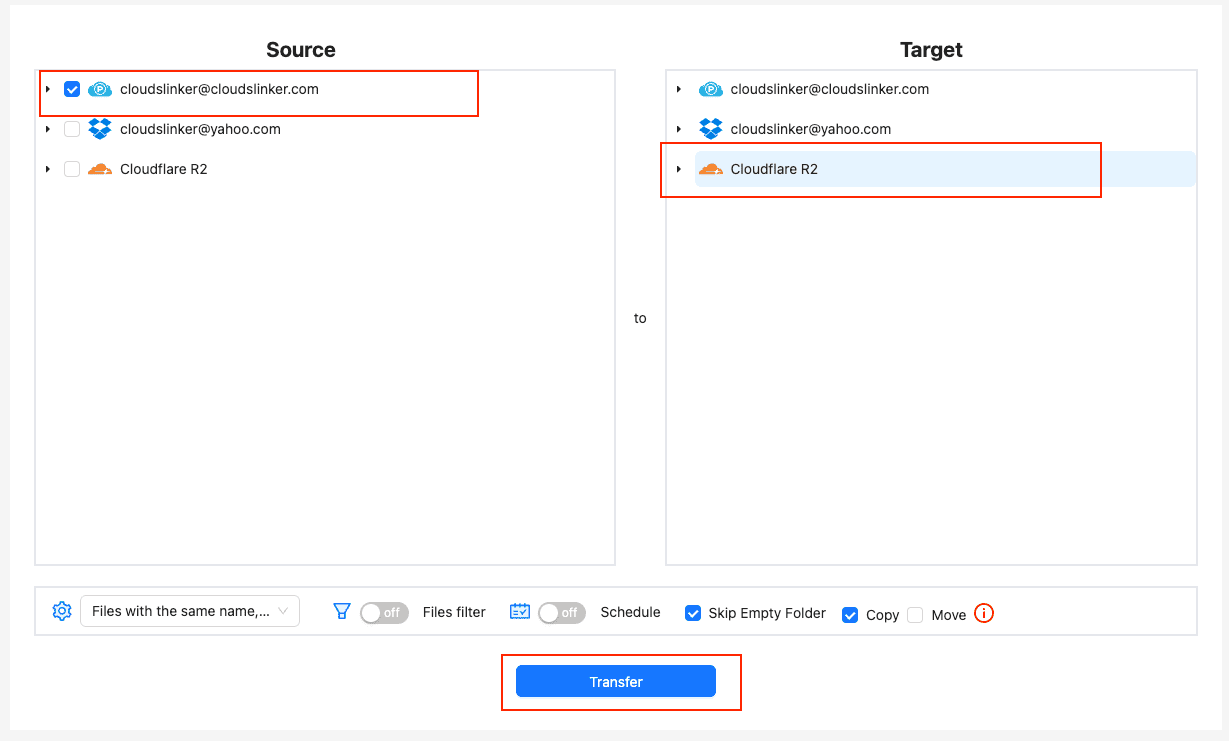
Pick the pCloud source folder (or the whole drive). Pick the R2 destination bucket and an optional key prefix — using a date-stamped prefix like archive/pcloud/2026-04/ keeps multiple migration runs auditable inside one bucket. Set filters: skip files above a size cap, exclude file types you don't want to pay storage on, or restrict to files modified since a specific date. Choose a conflict policy (skip / overwrite / rename).
4. Start, monitor, and pull the run log
Kick off the run. The progress view shows files completed, in-flight, and queued; failed objects retry automatically with exponential backoff (rate-limited Class A operations are the most common cause). Throughput sits in the 200–500 GB/day per-connection range, capped mainly by pCloud's egress for that account region. After the run, download the CSV log — it is what you'd attach to an audit if the move was a compliance migration.
After the migration
Verify a sample on Cloudflare R2
Pull a handful of objects via the S3 API or the bucket's r2.dev URL and check counts, sizes, and paths against the pCloud source.
- Compare object counts: Run
aws s3 ls s3://<bucket>/<prefix>/ --recursive | wc -lagainst the pCloud folder file count. - Re-verify on the access model: pCloud share links and Crypto folders do not carry to R2 — links are token-scoped to pCloud, Crypto needs in-place decryption first. Set R2 bucket-level public access only if the data is meant to be public.
Decide on the pCloud retention window
Most teams keep pCloud as the warm tier for 30–90 days while R2 settles in, then prune.
- Check R2 access logs and Class B ops counter: If the migrated data is being read at expected rates from R2, pCloud is safe to prune.
- Use pCloud Trash retention as a safety net: Deleted files stay in pCloud Trash 30 days on paid plans, extendable to 365 days with the Extended File History add-on — that is your roll-back window.
Revoke CloudsLinker access if the migration is one-shot
Remove the OAuth grants and the R2 API token once the work is done.
- Revoke pCloud OAuth: Sign in at
my.pcloud.comore.pcloud.com→ Settings → Authorized Apps → remove the CloudsLinker entry. - Revoke the R2 API token:
dash.cloudflare.com → My Profile → API Tokens— delete the token used by CloudsLinker. Account-equivalent secrets should never outlive their job.
FAQ — pCloud to Cloudflare R2
Will my pCloud Crypto-encrypted files survive the move to Cloudflare R2?
What is the maximum object size I can land in R2 from a pCloud transfer?
Does pCloud impose a daily download cap that will throttle the migration?
How much will Cloudflare R2 cost for the migrated dataset compared to pCloud?
Is CloudsLinker an official partner of pCloud or Cloudflare?
How do I revoke CloudsLinker access on pCloud and R2 after the migration finishes?
my.pcloud.com (US) or e.pcloud.com (EU), navigate to Settings → Authorized Apps, and remove the CloudsLinker entry. On Cloudflare, go to dash.cloudflare.com → My Profile → API Tokens and delete the R2 token you created for CloudsLinker. Account passwords and other tokens are unaffected.
Will folder structure and timestamps survive the pCloud → R2 transfer?
/Photos/2024/Italy becomes the key prefix Photos/2024/Italy/ in R2. File-modification timestamps are preserved as object metadata; pCloud's revision history and pCloud Crypto headers are not carried over. Share links from pCloud are not portable because they are token-scoped to pCloud.
How long does a 1 TB pCloud → R2 transfer typically take?
Can I run the migration as an incremental sync after the initial copy?
Should I use R2 Standard or Infrequent Access for migrated pCloud data?
Video walkthrough: pCloud to Cloudflare R2 with CloudsLinker
The video walks through both methods end-to-end — pCloud OAuth (US and EU regions), R2 token scoping, bucket selection, prefix strategy, and what the run log looks like during a multi-hundred-gigabyte transfer. It also covers the two failure modes most users hit on the first attempt: a wrong-region pCloud token, and using the Cloudflare Global API Key instead of a scoped per-bucket R2 token.
pCloud → Cloudflare R2 at a glance
| pCloud | Cloudflare R2 | |
|---|---|---|
| Free tier | 10 GB | 10 GB + 1M Class A ops + 10M Class B ops / month |
| Max single file / object | No per-file cap (limited by account quota) | 4.995 TiB (5 TiB − 5 GiB) |
| Storage price (paid) | $4.99/mo for 500 GB; $9.99/mo for 2 TB; $1190 lifetime for 10 TB | $0.015/GB/month (Standard); $0.01/GB/month (Infrequent Access) |
| Egress / download cost | $0 on first-party traffic; metered shared-link traffic 500 GB / 2 TB per month | $0 across S3 API, r2.dev, and Workers |
| Encryption at rest | AES (server-side); optional zero-knowledge pCloud Crypto add-on | AES-256 server-side; jurisdictional buckets for EU / FedRAMP |
| Region(s) | US (my.pcloud.com) or EU (e.pcloud.com) — picked at sign-up |
Global auto-routed, EU jurisdiction, FedRAMP jurisdiction |
| Connection method (CloudsLinker) | OAuth | S3 API (Account ID + Access Key + Secret Key) |
| Native export tool | pCloud desktop client (mounts as virtual drive) | None — read via S3 API or r2.dev URL |
| Trash / version retention | 15 days free, 30 days paid, 365 days with Extended File History | None native — implement via bucket lifecycle rules + versioning |
Limits and quotas you should know
pCloud:
- Max single file size: no published cap — bounded by total account quota.
- Daily / monthly transfer cap on first-party traffic: none — desktop client and OAuth API are not throttled.
- Shared-link bandwidth (the metered surface): 500 GB/month on Premium, 2 TB/month on Premium Plus.
- Trash retention: 15 days (Free), 30 days (paid), 365 days with the Extended File History add-on.
- Encryption: AES server-side by default; pCloud Crypto add-on is zero-knowledge with a password-derived key.
- Region: chosen at sign-up — US (
my.pcloud.com) or EU (e.pcloud.com); not switchable after.
Cloudflare R2:
- Max object size: 4.995 TiB (5 TiB minus 5 GiB) per object — multipart for anything large.
- Free tier: 10 GB storage, 1,000,000 Class A operations, 10,000,000 Class B operations per month.
- Class A operations (writes, lists, multipart): $4.50 per million above the free tier.
- Class B operations (reads, heads): $0.36 per million above the free tier.
- Storage price: $0.015/GB/month (Standard); $0.01/GB/month (Infrequent Access, with retrieval and 30-day minimum storage costs).
- Egress: $0 across the S3 API, public
r2.devdomain, and Cloudflare Workers. - Jurisdictional buckets: default global, EU, or FedRAMP — set at create time and immutable.
Sources: pCloud upload traffic limits, pCloud Trash and revisions retention, pCloud shared-link traffic by plan, Cloudflare R2 pricing, Cloudflare R2 limits, Cloudflare R2 storage classes.
Conclusion
If your dataset fits inside a single afternoon's bandwidth, the manual route — pCloud web download into a staging folder, then drag-and-drop into the R2 dashboard — is the cleanest because no third party touches your tokens. Anything north of 200 GB or with thousands of small files is where CloudsLinker pays for itself: pCloud's OAuth handles auth, R2's S3 API handles the writes, and the transfer keeps running while you close your laptop. Either way, the destination cost stays at $0.015/GB/month with no egress, which is usually why the move started in the first place.
Online Storage Services Supported by CloudsLinker
Transfer data between over 58 cloud services with CloudsLinker

OneDrive

Google Drive

Google Photos

Shared Drive

OneDrive for Business

Dropbox

Box

Mega

pCloud

Yandex

ProtonDrive

AWS

GCS

iDrive

Storj

DigitalOcean

Wasabi

1fichier

PikPak

TeleBox

OpenDrive

Backblaze B2

Fastmail file

SharePoint

Nextcloud

ownCloud

Premiumize me

HiDrive

Put.io

Sugar Sync

Jottacloud

Seafile

Ftp

SFtp

NAS

WebDav

4shared

Icedrive

Cloudflare R2

Scaleway

Hetzner Object Storage

Synology C2 Object Storage

S3 Compatible

Doi

iCloud Drive

iCloud Photos

FileLU

Zoho WorkDrive

Telia Cloud / Sky

Drime

Filen

TeraBox

Internxt

Degoo

Gofile

Pixeldrain

Shade

Koofr
Didn' t find your cloud service? Be free to contact: [email protected]
Further Reading
Effortless FTP connect to google drive: Transfer Files in 3 Easy Ways
Learn More >
Google Photos to OneDrive: 3 Innovative Transfer Strategies
Learn More >
Google Photos to Proton Drive: 3 Effective Transfer Techniques
Learn More >