Migrating from MEGA to Degoo Without Babysitting the Transfer Quota
Move files from MEGA to Degoo despite MEGA's rolling download quota — a manual method and an unattended server-side transfer with CloudsLinker.
Introduction
Degoo trades MEGA's headline feature — end-to-end encryption on everything — for something many archive owners value more: 5 TB of storage at $9.99 a month and a photo-centric mobile experience. The pain in leaving MEGA has never been deciding to go; it's the going. Free MEGA accounts meter downloads at roughly 5 GB per rolling six-hour window (the exact allowance flexes with network load), which turns a 100 GB exit into a week of quota-watching. This guide shows both exits: the manual download-and-upload grind, and a CloudsLinker job that rides out MEGA's quota windows automatically while writing straight into Degoo.
MEGA is the New Zealand-based encrypted cloud known for a 20 GB free tier and end-to-end encryption where your password is the key. Its distinctive constraint is the transfer quota: downloads are metered — loosely per 6-hour window on free accounts, monthly (1–16 TB) on Pro plans.
- 20 GB free (+ expiring achievement bonuses)
- E2E encryption on every file by default
- Free download quota ≈ 5 GB per ~6 h window
- No per-file size limit
Degoo is a Stockholm-built consumer cloud optimized for cheap volume and phone photos: 20 GB free, 500 GB at $2.99/mo, 5 TB at $9.99/mo, with recurring lifetime promotions. No transfer metering on downloads — its quirks are per-file caps and a mobile-first client lineup with no desktop sync.
- No download quota — the pain point MEGA users notice first
- 5 TB Ultimate at $9.99/mo
- AI photo feed; apps on all four mobile stores
- Zero-knowledge only in the paid Top Secret folder
| Feature | MEGA | Degoo |
|---|---|---|
| Free storage | 20 GB | 20 GB (ads; 90-day inactivity rule) |
| Download / transfer metering | Yes — ~5 GB/6 h free; 1–16 TB/mo on Pro | No download quota |
| ~$10/mo buys | Pro I: 2 TB storage + 2 TB transfer | Ultimate: 5 TB storage |
| Max single file | Unlimited (quota-bound) | 256 MB free / 50 GB subscription |
| Encryption | E2E on everything; password = key | Server-side AES; paid Top Secret folder for E2E |
| Connection in CloudsLinker | Account credentials | Account credentials |
Sources: MEGA help center, Cloudwards: MEGA transfer quota explained, Degoo: plans, Degoo Help Center: Account limits.
Size the job against the quota first: divide your MEGA usage by ~20 GB/day (free tier) to estimate the exit duration, and decide whether one month of MEGA Pro Lite ($/mo for 1 TB of transfer) is worth buying to compress it. On the Degoo side, match the plan to the volume and check for files over the 50 GB subscription cap. Import any shared folders you want to keep into your own MEGA drive beforehand, and clear MEGA's Rubbish Bin so you don't migrate deleted junk. Expect timestamps to reset to upload time on arrival in Degoo.
Method 1: Manual Download Through the Quota Windows
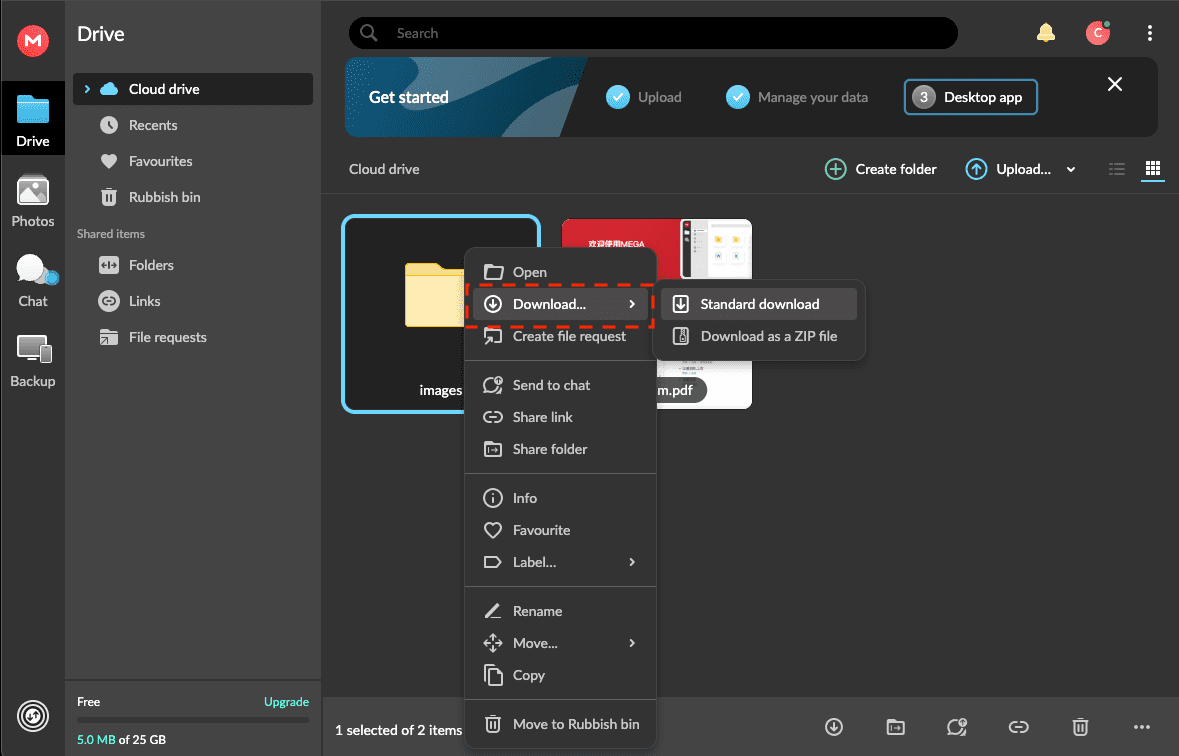
Step 1: Download from mega.nz in batches
Log in at mega.nz, select a batch of folders sized under the current quota window (~5 GB free), and download as ZIP. When the "transfer quota exceeded" banner appears, note the countdown and return after the window resets — repeat until done. The MEGA desktop app can queue larger batches but obeys the same metering.
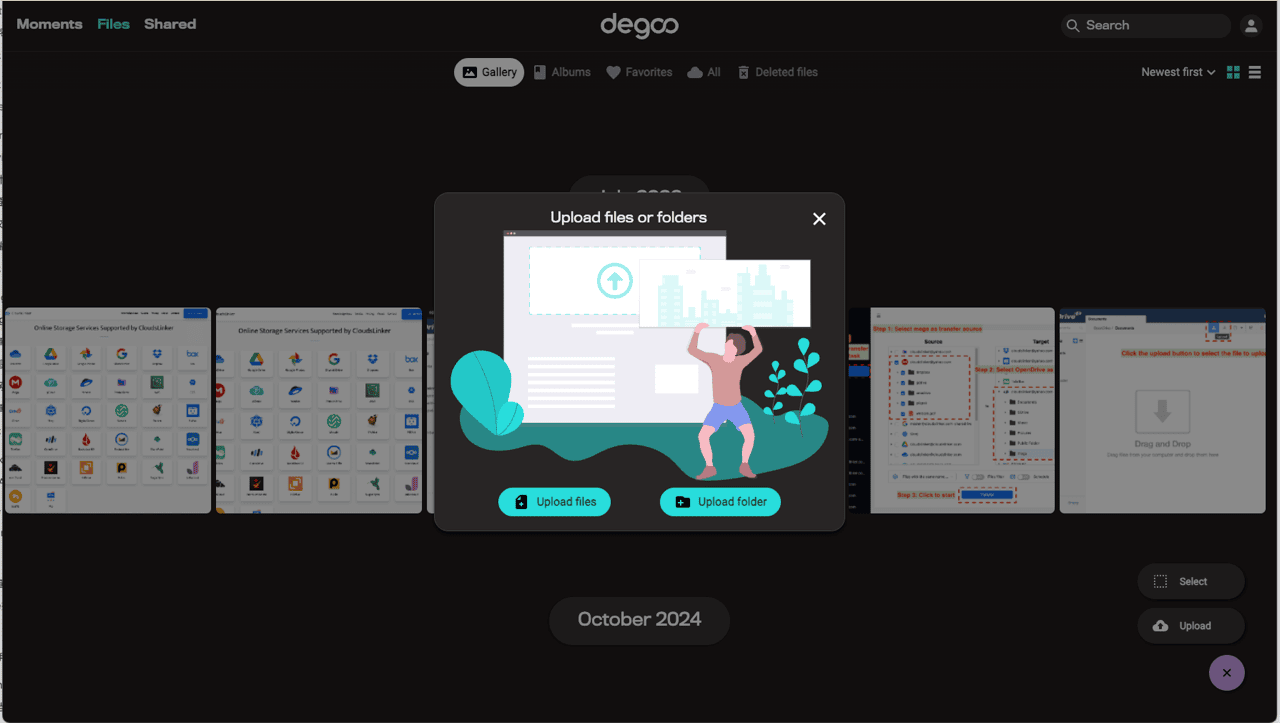
Step 2: Upload each batch to Degoo
As batches complete, extract and push them to Degoo through app.degoo.com (paid) or the mobile app (free). Interleaving download windows with uploads uses the waiting time, but the whole cycle stays manual — every window needs you back at the keyboard.
Viable below ~20 GB total. Beyond that, the quota arithmetic turns it into a week-long part-time job.
Method 2: Unattended Transfer with CloudsLinker
Quota pauses become the job's problem, not yours
CloudsLinker logs into MEGA with your credentials, decrypts content server-side (MEGA's password-derived key model requires this on any client), and writes into Degoo as it reads. When MEGA closes a quota window mid-job, the task parks itself and resumes when the window reopens — the multi-day cadence of a free-tier exit happens without a human refreshing mega.nz at 3 a.m.
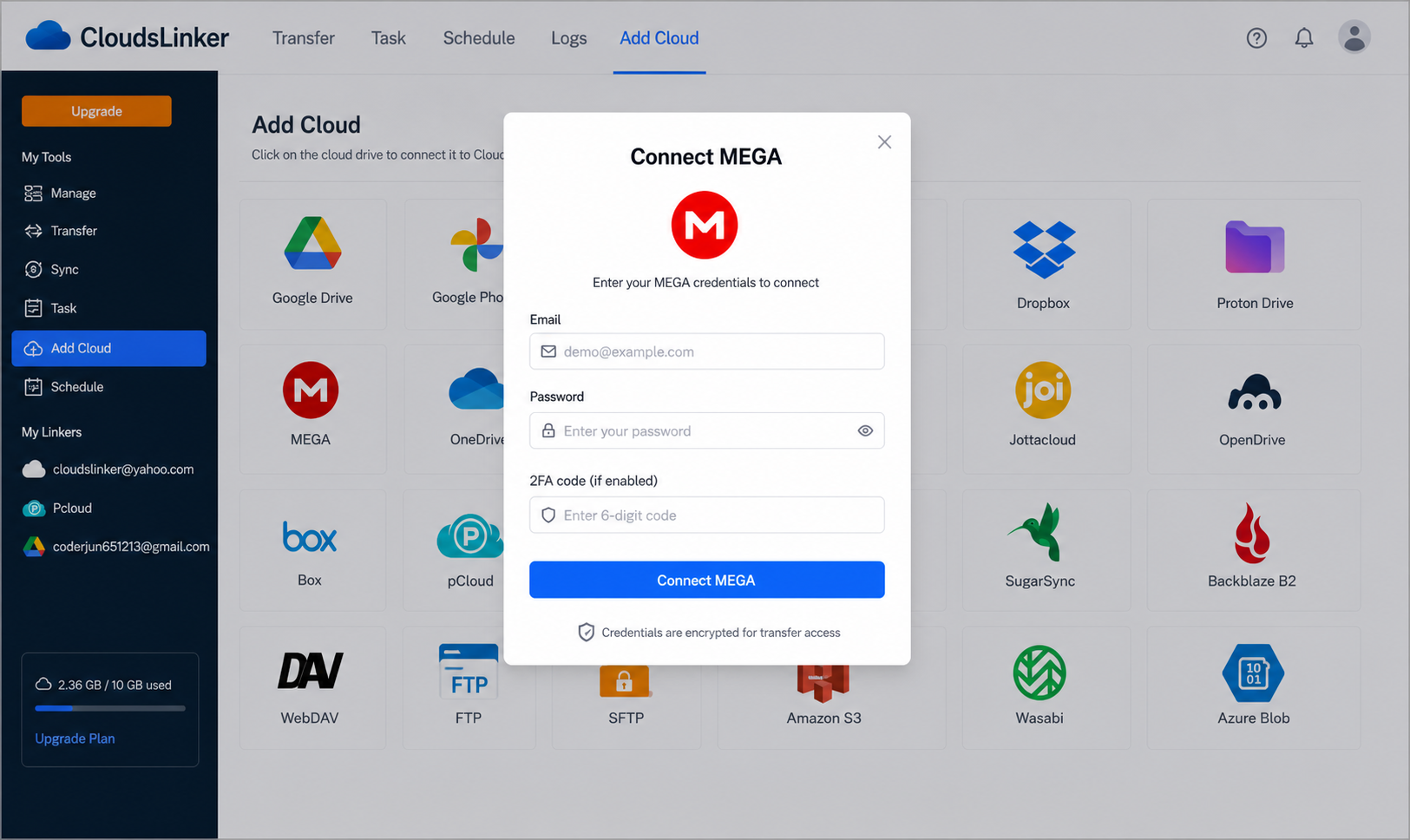
Step 1: Connect MEGA
Click Add Cloud → MEGA and enter your MEGA email and password. Because MEGA derives the master decryption key from the password, this single login both authenticates the session and enables content decryption. Rotate the password after migration to invalidate everything.
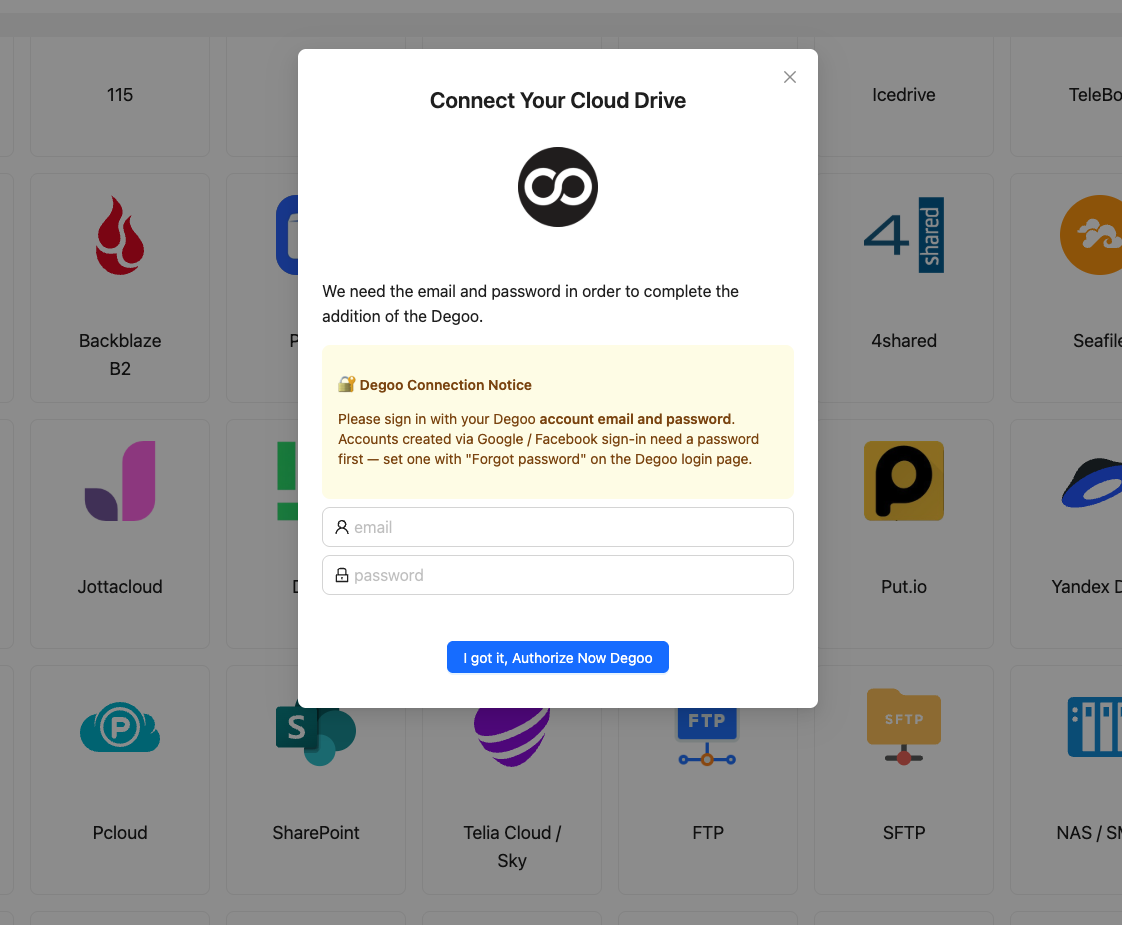
Step 2: Connect Degoo
Click Add Cloud → Degoo, enter the Degoo email and password, confirm. The session token is cached for reuse; revoke by changing the Degoo password. Standard folders only — the Top Secret folder is invisible to third-party tools by design.
Step 3: Configure the Transfer
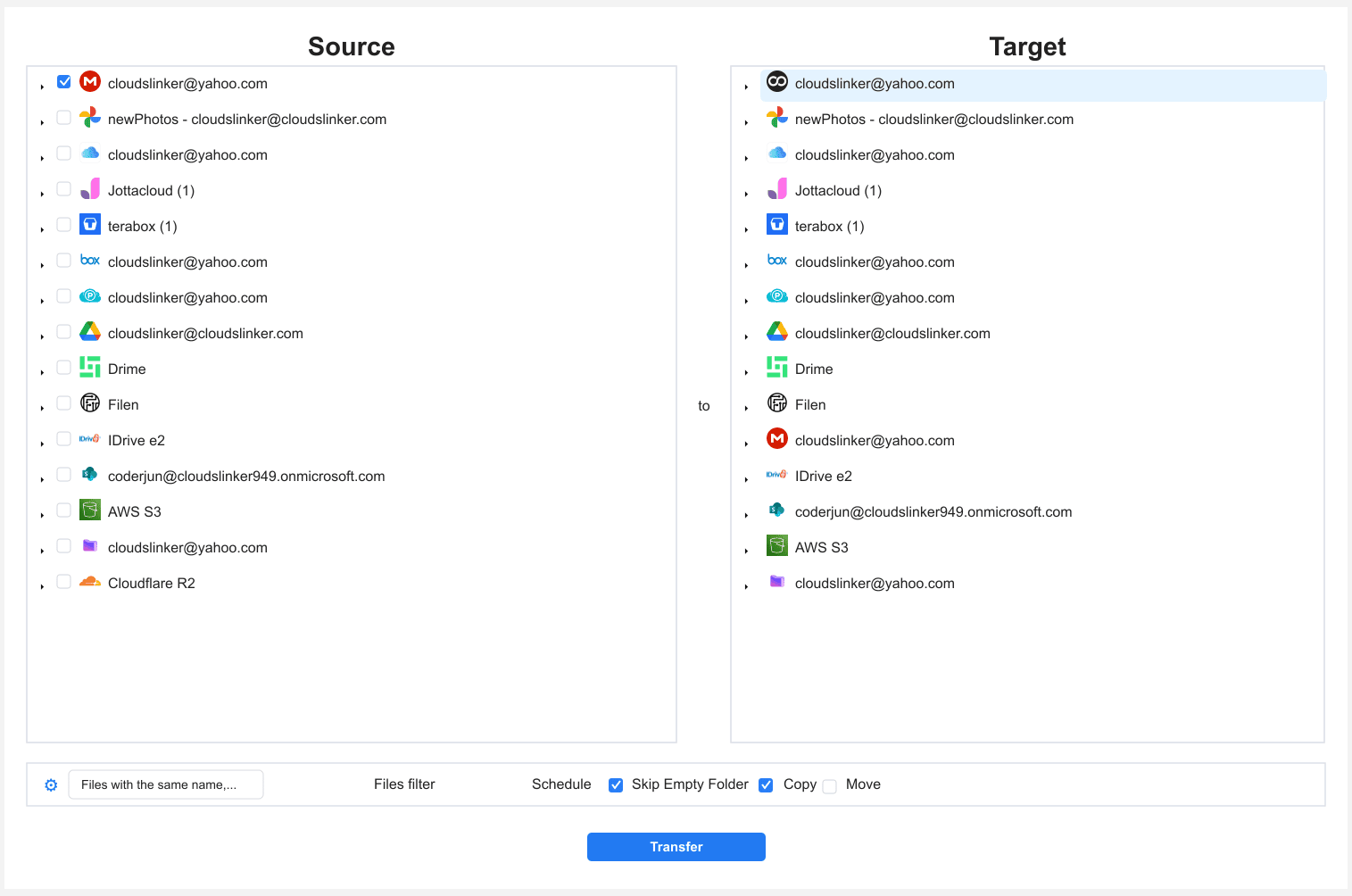
Under Transfer, choose MEGA as the source, mark the folders to move, and select the Degoo destination directory.
A size filter at 50 GB (or 256 MB for a free Degoo target) pre-empts per-file rejections. Copy mode is the sane default here — with quota pauses stretching the timeline, you want the MEGA originals intact until the final count check.
Step 4: Start and Monitor the Transfer
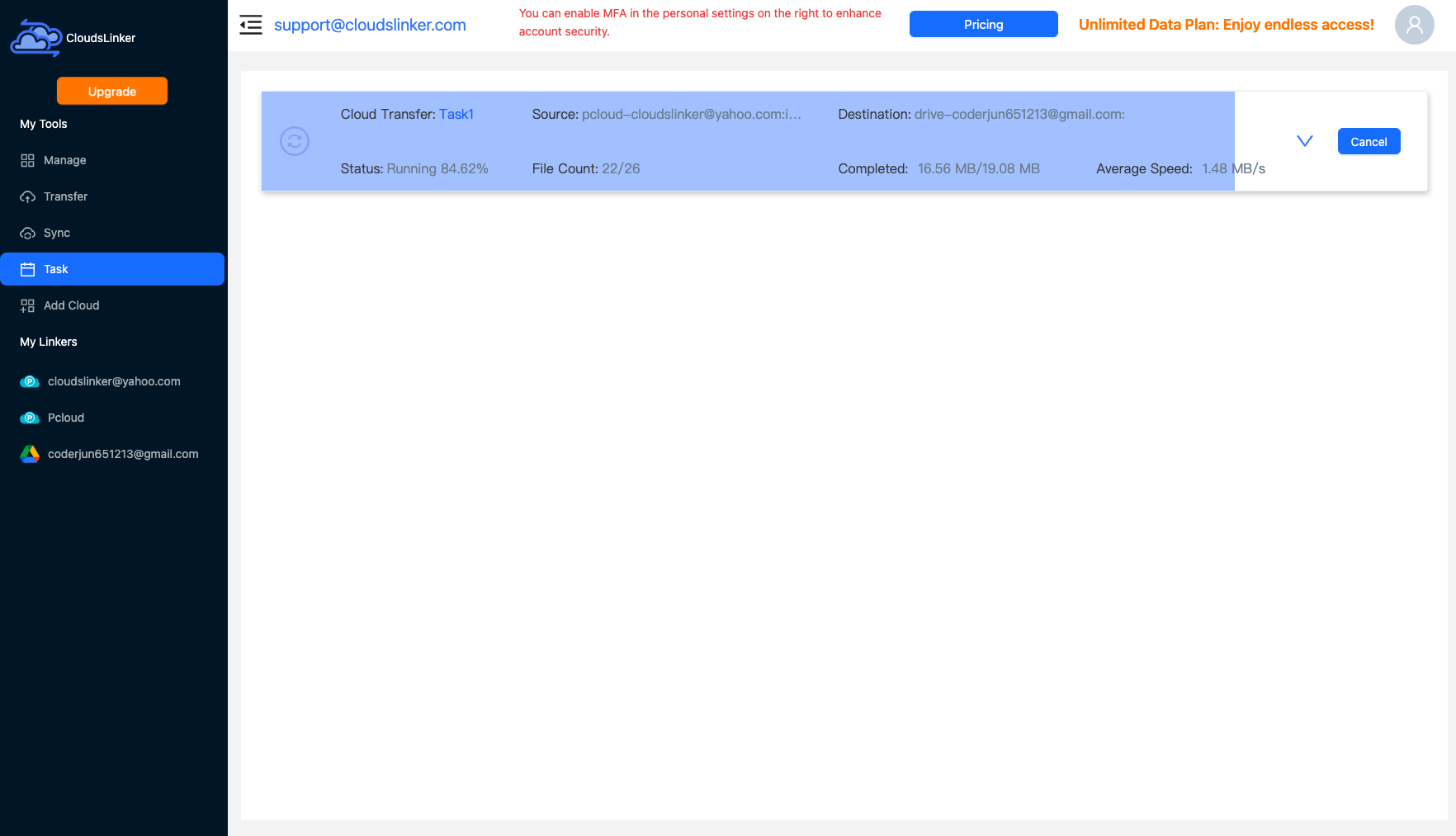
Start the job and check the Task List whenever curiosity strikes — it shows moved volume, current state (running or waiting out a quota window), and remaining items. No local machine, no browser tab, no quota countdown alarms.
Comparing the Ways to Transfer From MEGA to Degoo
| Method | Ease of Use | Speed | Best For | Uses Local Bandwidth | Skill Level |
|---|---|---|---|---|---|
| Manual batched download / upload | Tedious (quota supervision) | Slow — quota-gated | Accounts under ~20 GB | Yes — twice | Basic |
| CloudsLinker | Easy — quota handled automatically | As fast as MEGA's quota allows, unattended | Any size; free-tier exits especially | No | Basic |
- Do the quota math up front: free-tier exits move ~20 GB/day at best. A 200 GB account is a ten-day unattended job — or a one-day job with a single month of MEGA Pro purchased for its transfer allowance.
- Import shared folders before starting: 'Shared with me' content isn't yours until you import it to your cloud drive, and imports count against your 20 GB, so sequence large imports between transfer batches.
- Know what you're trading on encryption: MEGA is E2E everywhere; Degoo's standard folders aren't. Put the genuinely private subset into Degoo's Top Secret folder via the app, or reconsider moving it at all.
- Watch for achievement-bonus expiry on the MEGA side: if your account holds more than 20 GB thanks to expired-soon bonuses, MEGA blocks uploads but not downloads — migrate out before the over-quota grace handling gets complicated.
- Pick the Degoo tier by media profile: phone-photo archives compress into Pro's 500 GB; video collections don't — go Ultimate.
- Rotate both passwords after the move: the MEGA password doubled as a decryption key during transfer, and the Degoo password is the only revocation lever for its cached session.
Frequently Asked Questions
Conclusion
Small MEGA accounts — under the ~20 GB that fits a single day of free-tier quota windows — can leave manually in an afternoon of supervised downloading. Anything larger either needs a MEGA Pro month purely to unlock transfer volume, or a tool that treats quota pauses as routine: CloudsLinker retries through the six-hour windows unattended and delivers the files into Degoo without your machine in the loop. Verify counts in the task report before deleting the MEGA originals, and remember Degoo's free tier won't hold an untouched archive past 90 days.
Online Storage Services Supported by CloudsLinker
Transfer data between over 58 cloud services with CloudsLinker

OneDrive

Google Drive

Google Photos

Shared Drive

OneDrive for Business

Dropbox

Box

Mega

pCloud

Yandex

ProtonDrive

AWS

GCS

iDrive

Storj

DigitalOcean

Wasabi

1fichier

PikPak

TeleBox

OpenDrive

Backblaze B2

Fastmail file

SharePoint

Nextcloud

ownCloud

Premiumize me

HiDrive

Put.io

Sugar Sync

Jottacloud

Seafile

Ftp

SFtp

NAS

WebDav

4shared

Icedrive

Cloudflare R2

Scaleway

Hetzner Object Storage

Synology C2 Object Storage

S3 Compatible

Doi

iCloud Drive

iCloud Photos

FileLU

Zoho WorkDrive

Telia Cloud / Sky

Drime

Filen

TeraBox

Internxt

Degoo

Gofile

Pixeldrain

Shade

Koofr
Didn' t find your cloud service? Be free to contact: [email protected]
Further Reading
Effortless FTP connect to google drive: Transfer Files in 3 Easy Ways
Learn More >
Google Photos to OneDrive: 3 Innovative Transfer Strategies
Learn More >
Google Photos to Proton Drive: 3 Effective Transfer Techniques
Learn More >