Amazon S3 vs DigitalOcean Spaces (2026): Which Is Cheaper?
Verdict: 1 TB stored + 1 TB egress costs about $20/month on Spaces vs roughly $107 on Amazon S3 (July 2026 prices). Full cost math, trade-offs, and migration steps.
Introduction
Short answer: for storage-plus-bandwidth workloads, DigitalOcean Spaces is dramatically cheaper — storing 1 TB and serving 1 TB of downloads a month costs about $20 on Spaces versus roughly $107 on Amazon S3 at July 2026 list prices, because S3 charges about $0.09/GB egress while Spaces includes 1 TB of outbound transfer in its $5 base plan. Pick Amazon S3 when you need its storage classes, compliance coverage, and deep AWS ecosystem integration; pick Spaces when you want flat, predictable pricing behind an S3-compatible API. Below: the real price math, the feature trade-offs, and how to migrate between them without downloading anything.
The Verdict: Which Should You Pick?
Pick DigitalOcean Spaces if…
- Your workload is plain object hosting — backups, media files, static assets, app uploads — and data regularly leaves the bucket.
- You want a bill you can predict: $5/month covers 250 GB of storage and 1 TB of outbound transfer, with flat $0.02/GB storage and $0.01/GB egress beyond that.
- You already use S3 tooling — Spaces' S3-compatible API means SDKs, rclone, and boto3 work with an endpoint change.
- You want a CDN without a separate service: Spaces includes one per bucket at no extra charge.
Pick Amazon S3 if…
- Your application lives in AWS and leans on IAM policies, Lambda triggers, event notifications, or analytics services that read straight from S3.
- You need lifecycle tiering — Standard → Infrequent Access → Glacier — to keep large cold archives cheap.
- Compliance certifications and audit tooling (Object Lock, access logs) are hard requirements.
- Your egress is minimal: data that is written once and rarely downloaded blunts S3's biggest cost disadvantage.
The rest of this page shows the price math behind that verdict, a feature-by-feature comparison, and three ways to migrate between the two services.
Exploring Amazon S3
Overview of Amazon S3
Amazon S3 is renowned for its secure, durable, and highly-scalable cloud storage service. It caters to a broad spectrum of data storage scenarios ranging from small-scale projects to enterprise-level deployments. Its rich feature set supports demanding data management and security requirements.
Distinguishing Features of Amazon S3
- Robust data protection and encryption options.
- Extensive compliance certification coverage.
- Detailed access control mechanisms.
- Seamless AWS ecosystem integration for comprehensive cloud solutions.
Subscription Options and Pricing
- Flexible pricing based on consumption, offering various storage classes for efficiency.
- Attractive pricing for bulk data storage and long-term archiving.
Best Use Cases
- Enterprises in need of advanced data analytics and storage management.
- Organizations looking for deep cloud service integrations.
Discovering DigitalOcean Spaces
Getting to Know DigitalOcean Spaces
DigitalOcean Spaces is recognized for its user-friendly cloud storage service, which simplifies data storage without compromising on reliability or cost-effectiveness. Its no-fuss approach is particularly appealing to developers and small to medium-sized businesses.
Core Benefits and Features
- Transparent, straightforward pricing without unexpected expenses.
- User-friendly management console, enhancing the storage experience.
- Effective tools for file sharing and collaboration.
- S3-compatible API for easy migration and integration.
Pricing Structure
- Among the most affordable cloud storage services, with clear, upfront pricing.
- Budget-friendly plans designed for predictability in billing.
Ideal Scenarios for Use
- Startups and SMEs seeking cost-effective storage solutions.
- Businesses aiming for straightforward cloud storage with minimal setup.
Comparative Analysis: Amazon S3 Versus DigitalOcean Spaces
Storage Flexibility and Options
Amazon S3 shines with its myriad of storage classes catering to varying needs—from frequently accessed data (S3 Standard) to cost-efficient archiving (Glacier). Its scalable design accommodates data growth seamlessly. In contrast, DigitalOcean Spaces simplifies the landscape with a single pricing model, appealing to those with predictable storage demands.
Ensuring Data Security and Protection
Both platforms prioritize security, but Amazon S3 edges out with features like S3 Object Lock for WORM (Write Once, Read Many) capabilities and comprehensive access management tools. S3's detailed audit logs provide transparency over data access, a critical consideration for compliance and security-first organizations.
Performance and Data Accessibility
S3 excels in performance, offering low-latency and high-throughput storage options backed by Amazon's extensive infrastructure. It ensures rapid data access globally. DigitalOcean Spaces focuses on providing a straightforward, user-friendly experience for managing storage with minimal complexity, targeting users who value simplicity and affordability.
Cost Management and Scalability
Amazon S3's diverse pricing tiers allow for cost optimization based on access patterns and storage needs. Meanwhile, DigitalOcean Spaces offers a clear, single-tier pricing structure, simplifying budgeting for businesses with straightforward storage requirements.
Customer Experience and Support
S3 and DigitalOcean Spaces both aim to provide a seamless user experience with robust support channels. Amazon S3 boasts in-depth documentation and community forums for technical guidance, whereas DigitalOcean Spaces is known for its intuitive interface and straightforward support, making it accessible for a wider audience including startups and small businesses.
Comparing Cloud Storage: Amazon S3 vs DigitalOcean Spaces
The Real Price Math
List prices checked July 14, 2026 (USD, S3 Standard class, US regions). The two models differ in shape: S3 meters everything separately, while Spaces bundles a storage and bandwidth allowance into a flat base fee.
| Cost item | Amazon S3 (Standard) | DigitalOcean Spaces |
|---|---|---|
| Base subscription | None — pure pay-per-use | $5/month, includes 250 GB storage + 1 TB outbound transfer |
| Storage | $0.023/GB — ≈ $23.55 per TB/month | $0.02/GB beyond the included 250 GB — 1 TB ≈ $20/month total |
| Egress (data out) | ≈ $0.09/GB after 100 GB/month free — ≈ $83 to move 1 TB out | 1 TB/month included, then $0.01/GB |
| API requests | Billed per 1,000 requests (class-dependent) | Included |
| Scenario: 1 TB stored + 1 TB served per month | ≈ $107/month ($23.55 storage + ≈ $83 egress) | ≈ $20/month ($5 base + $15 extra storage, egress covered) |
Quick takeaway: the moment your objects are downloaded — by users, apps, or another cloud — S3's egress meter dominates the bill. A workload that serves what it stores pays roughly 5× more on S3 than on Spaces. If your data is written once and almost never read back, the gap narrows to storage alone ($23.55 vs $20 per TB), and S3's feature set can justify the difference. For a wider comparison across 10+ providers, see our cloud storage pricing comparison — including what it really costs to move 1 TB out of each service.
Streamlining Data Transfer: Amazon S3 to DigitalOcean Spaces
Migrating data between cloud storage services necessitates a well-planned strategy for a seamless transition. This guide outlines effective techniques for moving data from Amazon S3 to DigitalOcean Spaces, emphasizing Python scripts for direct transfers and leveraging third-party solutions for efficient migration.
Manual Transfer Between Amazon S3 and DigitalOcean Spaces
For situations where script-based automation is not preferred, data can be manually transferred between Amazon S3 and DigitalOcean Spaces using their web consoles.
Downloading from Amazon S3
Access the Amazon S3 console, locate and select the desired files or buckets. Use the "Download" option to save your data locally.
Uploading to DigitalOcean Spaces
Log in to the DigitalOcean Spaces console. Navigate to your Space, and use the "Upload Files" or "Upload Folder" options to transfer your downloaded data from Amazon S3.
Utilizing Python for Effortless Data Transfer
Python's extensive library support presents an uncomplicated approach to shifting data between cloud
environments. The following Python example uses the boto3 library alongside
DigitalOcean's S3-compatible API for initiating the transfer of files from Amazon S3 to DigitalOcean
Spaces.
Note: Ensuring the installation of necessary Python packages and setting up Amazon S3 and DigitalOcean Spaces credentials is essential before proceeding with the script.
                            import boto3

                            # Define bucket names
                            source_bucket = 'your-s3-bucket-name'
                            destination_bucket = 'your-digitalocean-space-name'

                            # Configure Amazon S3
                            s3 = boto3.client('s3', aws_access_key_id='S3_ACCESS_KEY',
                                            aws_secret_access_key='S3_SECRET_KEY', region_name='your-s3-region')

                            # Setup DigitalOcean Spaces
                            spaces = boto3.client('s3',
                                                aws_access_key_id='SPACES_ACCESS_KEY',
                                                aws_secret_access_key='SPACES_SECRET_KEY',
                                                endpoint_url='https://nyc3.digitaloceanspaces.com')

                            # Transfer files
                            objects = s3.list_objects(Bucket=source_bucket)['Contents']
                            for obj in objects:
                                file_name = obj['Key']
                                print(f'Transferring {file_name}...')
                                copy_source = {'Bucket': source_bucket, 'Key': file_name}
                                spaces.copy(copy_source, destination_bucket, file_name)

                            print('Data migration successful.')
Enhance Your Cloud Storage Strategy with CloudsLinker
Elevate Cloud Storage Integration with CloudsLinker
CloudsLinker revolutionizes cloud storage integration by facilitating a seamless connection
between Amazon S3 and DigitalOcean Spaces. Supporting an extensive array of over
36 cloud services, CloudsLinker simplifies data synchronization while optimizing
bandwidth usage. This guide showcases an efficient pathway to link Amazon S3 with DigitalOcean
Spaces, leveraging CloudsLinker’s secure and intuitive interface.
Step 1: Begin with CloudsLinker
Navigate to the CloudsLinker homepage to initiate your journey. Sign in with your account details or register to dive straight into the platform. Directly access CloudsLinker here: Visit CloudsLinker.
Step 2: Configuring Amazon S3
Setting up Amazon S3 for use with CloudsLinker involves a series of steps designed for streamlined configuration:
Step 2.1: IAM User Creation
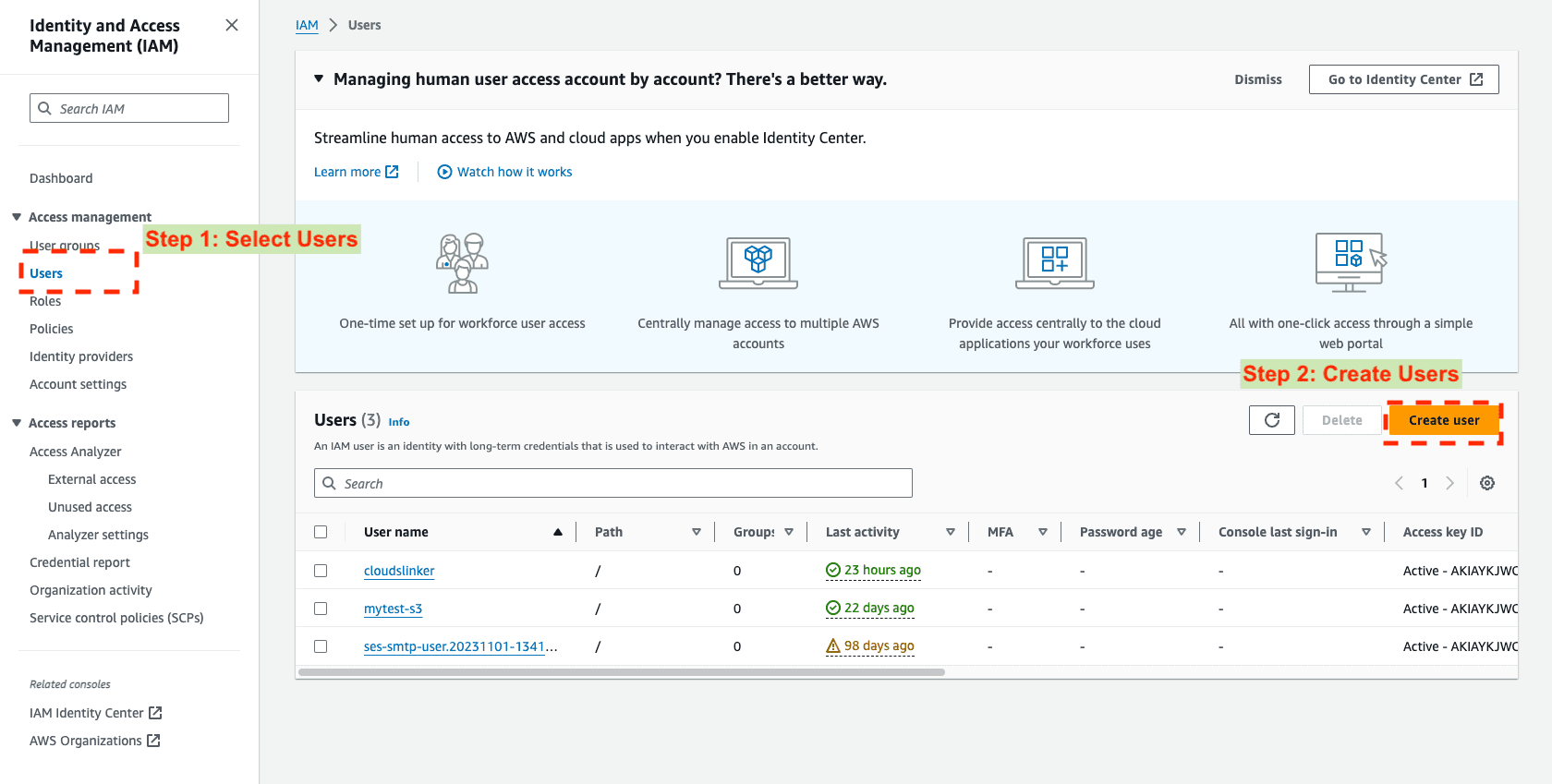
First, go to the AWS Management Console. Under the IAM section, select Users and then click ‘Create user’. This is a vital step for creating specific credentials for Amazon S3 access.
Step 2.2: Assign Access Permissions
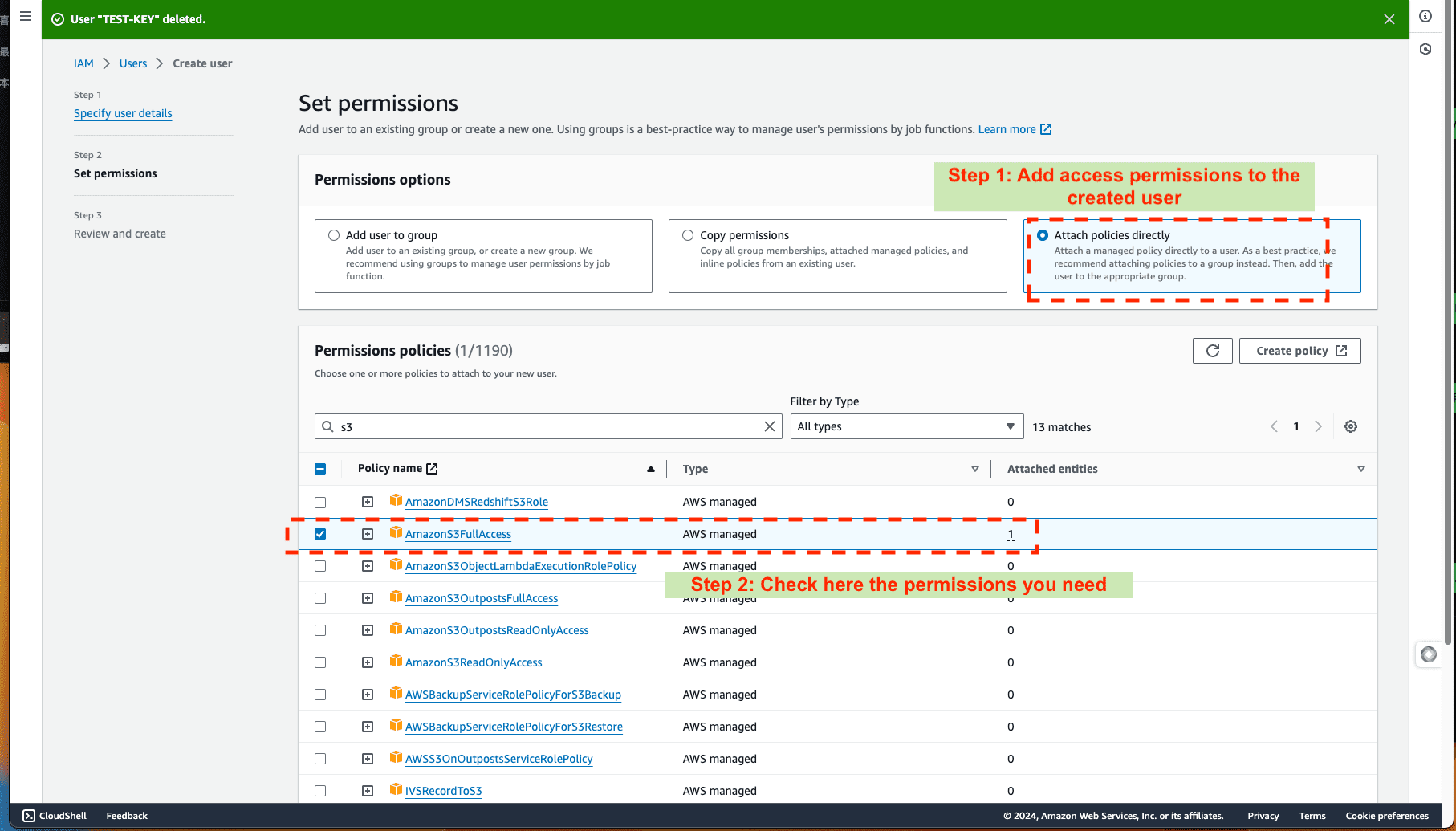
Continue by assigning the appropriate permissions. Select ‘Attach policies directly’ and choose AmazonS3FullAccess to ensure the user has comprehensive S3 access.
Step 2.3: Access Key Creation
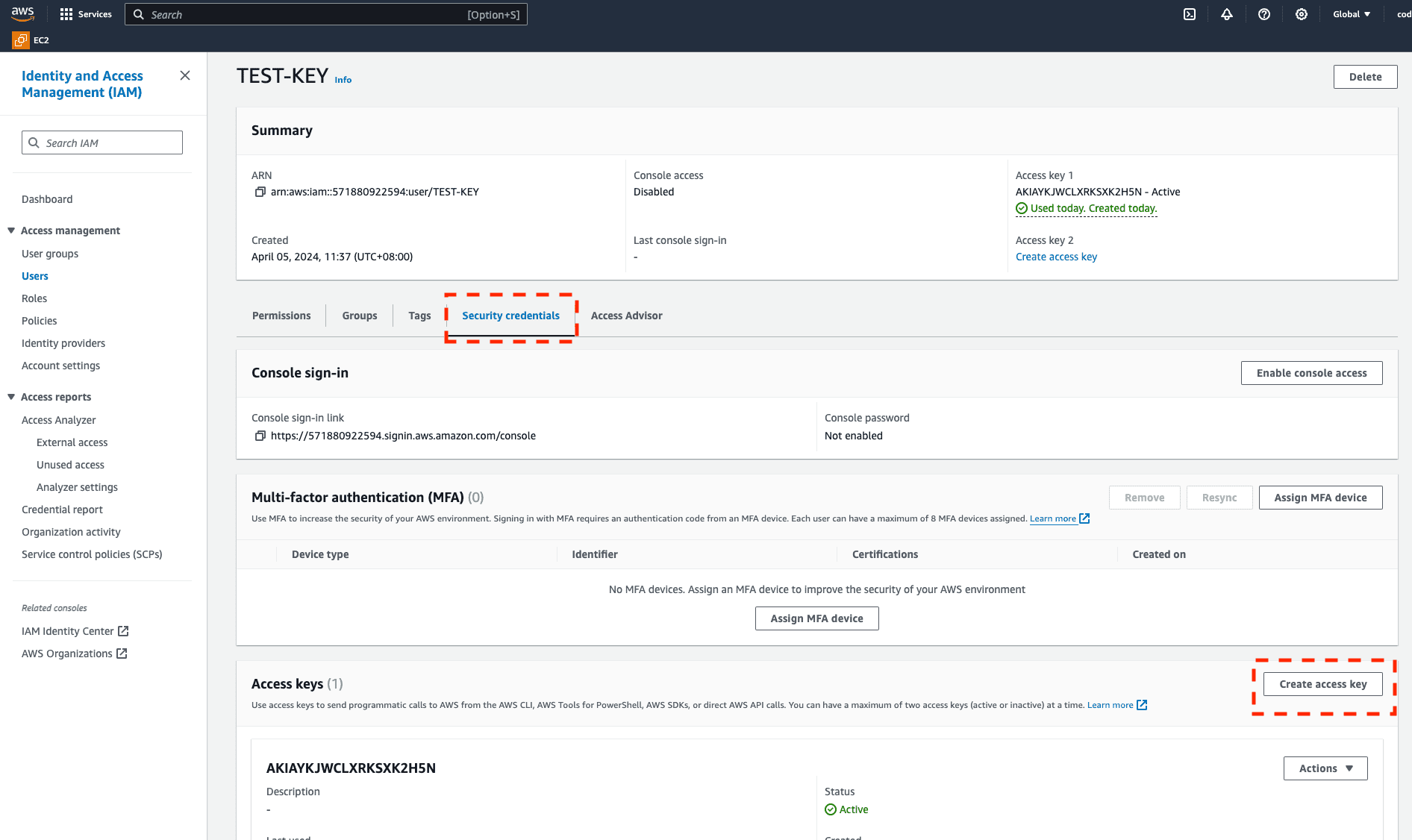
Within the IAM user interface, find the Security credentials tab and generate new access keys. These keys are crucial for CloudsLinker integration.
Step 2.4: Integrating with CloudsLinker
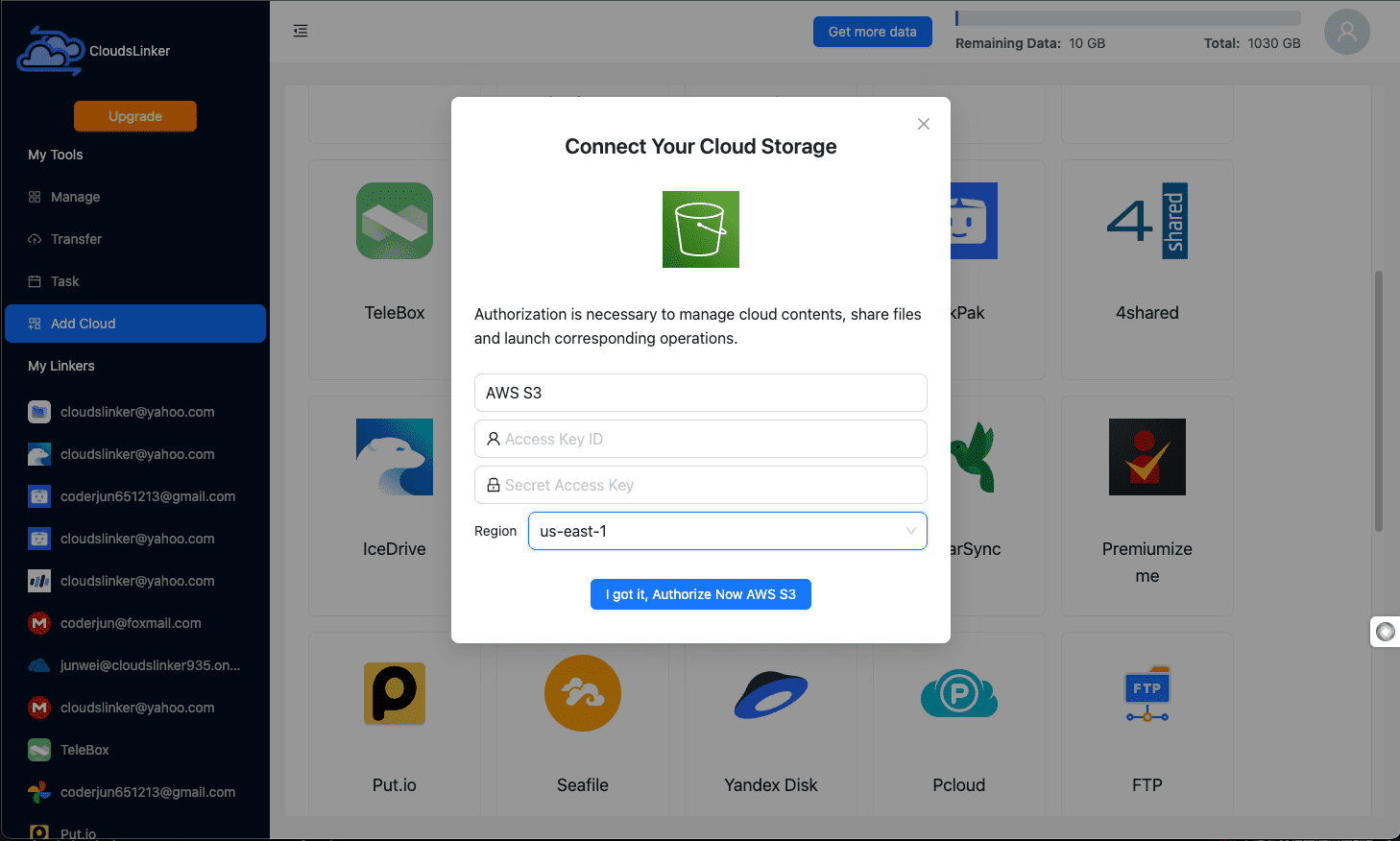
With your AWS access keys in hand, head over to CloudsLinker. Under ‘Add Cloud’, select Amazon S3 and enter your Access Key and Secret Access Key to finalize the integration.
Step 3: DigitalOcean Spaces Integration
For DigitalOcean Spaces, simply navigate to the DigitalOcean dashboard and create a Spaces access key. This single step is necessary to connect your Space with CloudsLinker, streamlining the setup process.
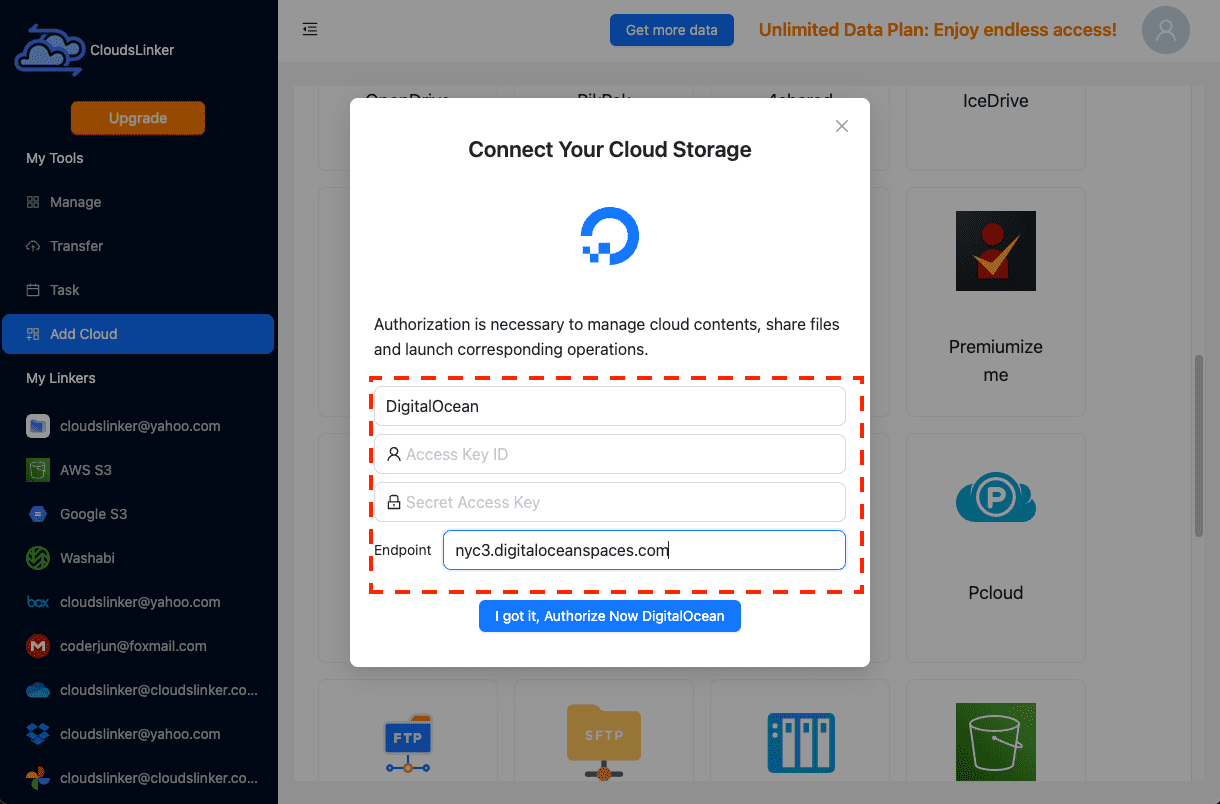
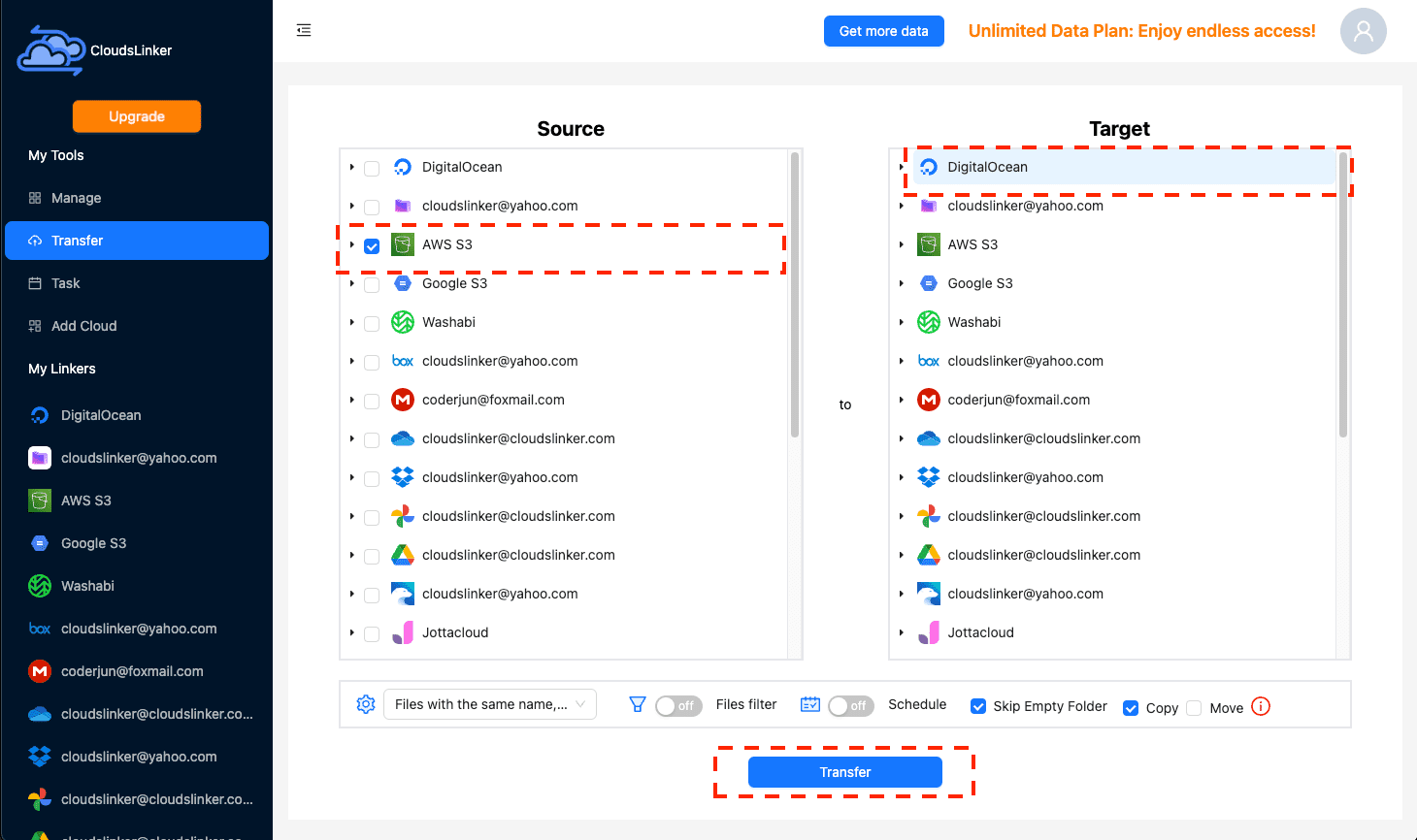
Step 4: Data Transfer Configuration
Organize the data transfer by choosing Amazon S3 as the source and DigitalOcean Spaces as the destination. Tailor the transfer process by specifying file types and scheduling according to your needs.
Step 5: Task Management
Utilize CloudsLinker’s task management tools for overseeing and fine-tuning your data transfers in real-time, ensuring an efficient migration path.
Conclusion: Confirming Data Transfer
Conclude the setup by verifying the successful transfer of your data to DigitalOcean Spaces, certifying a secure and complete migration via CloudsLinker.
Streamlined Data Migration: Amazon S3 vs. DigitalOcean Spaces via CloudsLinker
| Feature | Amazon S3 | DigitalOcean Spaces | CloudsLinker's Impact |
|---|---|---|---|
| Integration Complexity | Requires navigating through AWS's detailed but intricate interface. | Simple initial setup with minimalistic design, though in-depth utilization demands familiarity with its features. | CloudsLinker streamlines the integration with an intuitive setup process, reducing the complexity significantly. |
| Resource Efficiency | Direct interactions may impact local bandwidth, especially with extensive datasets. | As with S3, the impact on bandwidth and local resources is contingent on the size of the transferred data. | Employs cloud-to-cloud transfers, conserving local bandwidth and negating the need for significant local resource engagement. |
| Data Migration Velocity | Variable speeds based on internet connectivity and selected AWS region. | Comparable transfer rates, influenced by the proximity to DigitalOcean’s infrastructure. | Enhances transfer efficiency with swift server-to-server migrations, considerably minimizing time over direct transfer methods. |
| Scalability and Adaptability | Extremely scalable, accommodating large volumes of data, yet requiring advanced planning for effective scaling. | Facilitates straightforward scaling with a clear, cost-efficient pricing model suitable for expanding data volumes. | Effortlessly adjusts to accommodate integration with over 36 cloud platforms, offering a versatile and efficient scaling mechanism for diverse data management requirements. |
| Efficiency in Operation | Direct management of vast datasets through S3 demands continuous optimization and oversight. | While DigitalOcean Spaces simplifies storage with its uncomplicated management and pricing, it might not offer the breadth of S3’s features. | By automating storage allocation and transfer management, CloudsLinker significantly elevates operational efficiency with minimal user effort. |
| Cost Efficiency | Affordable for scalable initiatives, though necessitates meticulous management of storage and transfer expenses. | Praised for its cost-effective storage solutions and transparent transfer pricing. | Despite CloudsLinker’s additional service charges, it provides substantial value through efficiencies in time, bandwidth preservation, and streamlined data migration strategies. |
Frequently Asked Questions (FAQs)
Conclusion
The price question has a clear answer: unless your data never leaves the bucket, DigitalOcean Spaces costs a fraction of Amazon S3 — the gap is driven almost entirely by egress, S3's ~$0.09/GB toll versus the 1 TB of transfer Spaces includes. S3 remains the right call for AWS-native architectures, lifecycle tiering, and strict compliance requirements. If the math sends you toward Spaces, the S3-compatible API keeps tooling changes minimal, and a server-to-server copy with CloudsLinker moves the objects without routing them through your machine — though S3's egress fee applies to the migration itself, one final reason not to let cold data accumulate there.
Online Storage Services Supported by CloudsLinker
Transfer data between over 60 cloud services with CloudsLinker

OneDrive

Google Drive

Google Photos

Google Takeout

Shared Drive

OneDrive for Business

Dropbox

Box

Mega

pCloud

Yandex

ProtonDrive

AWS
GCS

iDrive

Storj

DigitalOcean

Wasabi

1fichier

PikPak

TeleBox

OpenDrive

Backblaze B2

Fastmail file
SharePoint

Nextcloud

ownCloud

Premiumize me

HiDrive

Put.io

Sugar Sync

SmugMug

Jottacloud

Seafile

Ftp

SFtp

NAS

WebDav

4shared

Icedrive

Cloudflare R2

Scaleway

Hetzner Object Storage

Synology C2 Object Storage

S3 Compatible

Doi

iCloud Drive

iCloud Photos

FileLU

Zoho WorkDrive

Telia Cloud / Sky

Drime

Filen

TeraBox

Internxt

Degoo

Gofile

Pixeldrain

Shade

Koofr
Didn' t find your cloud service? Be free to contact: [email protected]
Further Reading
Effortless FTP connect to google drive: Transfer Files in 3 Easy Ways
Learn More >
Google Photos to OneDrive: 3 Innovative Transfer Strategies
Learn More >
Google Photos to Proton Drive: 3 Effective Transfer Techniques
Learn More >