Nextcloud or WebDAV to Proton Drive: Keep End-to-End Encryption Without Running a Server
Move files from Nextcloud, ownCloud or any WebDAV server to Proton Drive with desktop apps, rclone, or a server-side copy. Covers 2FA and what won't move.
Introduction
Proton Drive encrypts every file and file name on your device before upload, and Proton itself cannot read them. That is the same promise people get from running their own Nextcloud — minus the server: no updates to apply, no disk to watch, no certificate to renew. The move usually comes when a self-hosted box, a shared hosting plan or an old ownCloud instance is about to be retired, and the owner wants to keep the privacy without keeping the maintenance.
The difficulty is that the two ends don't share a protocol. Your server speaks WebDAV; Proton Drive has no WebDAV endpoint and no public API, so the sync tools that work between WebDAV services cannot write to it. Three tools can, and which one fits depends on your setup: whether the server is reachable from the internet, whether Proton's two-factor authentication can be off for a day, and whether you are on Linux.
Two Lists to Check Before You Start
1. What leaves the server, and what doesn't
A Nextcloud or ownCloud server holds more than files, but every route to Proton Drive reads the server over WebDAV — and WebDAV only sees the file tree.
| On your server | Copied? | What to do |
|---|---|---|
| Files and folders | ✔ Yes | The folder structure is recreated in Proton Drive |
| Files under Nextcloud server-side encryption | ✔ Yes | The server decrypts them when they are read over WebDAV |
| Nextcloud end-to-end encrypted folders | ✘ Only ciphertext with scrambled names | Sync them with the Nextcloud desktop client, which holds your keys, and upload the decrypted files |
| Calendars (CalDAV) and contacts (CardDAV) | ✘ No | Export .ics and .vcf files; import them into Proton Calendar and Proton Contacts |
| Share links, user and federated shares | ✘ No | Note the ones still in use and recreate them in Proton Drive |
| File versions and the trash bin | ✘ No | Restore anything you still need into the normal file tree first |
| Comments, tags, favourites | ✘ No | Nothing to carry them into |
2. How much space you need on Proton
Nextcloud shows your usage at the bottom of the Files navigation. Uploads stop when the Proton quota is full, so choose the plan first:
| Proton plan | Storage | Monthly billing |
|---|---|---|
| Proton Free | 5 GB | $0 |
| Drive Plus | 200 GB | $4.99 |
| Proton Unlimited | 500 GB | $12.99 |
| Proton Duo | 2 TB, 2 users | $19.99 |
| Proton Family | 3 TB, up to 6 users | $29.99 |
From proton.me/drive/pricing, checked October 2026; annual billing costs less. Proton states no file size limit.
Which Situation Are You In?
Proton Drive only accepts files that were encrypted on the client, so only tools that carry Proton's encryption can write to it: CloudsLinker, Proton's own apps and rclone. Find your setup below — each section starts with who it is for.
Your Server Is Reachable from the Internet
This fits you if your Nextcloud, ownCloud or WebDAV server has a public HTTPS address, and you can turn Proton's two-factor authentication off until the migration is done.
CloudsLinker reads the server over WebDAV and writes into Proton Drive with Proton's encryption, on its own servers. Your computer needs no free disk space and can be switched off while it runs.
Get the WebDAV address first. In Nextcloud's Files app, open Files
settings; the address ends in /remote.php/dav/files/USERNAME/. That last part is
your Nextcloud user ID, which can differ from your display name or login email, so copy it rather than
type it (/remote.php/webdav/ in older guides is a legacy alias). If the account has 2FA,
create an app password under Personal settings → Security → Devices & sessions — the
normal password will be rejected. ownCloud and NAS WebDAV servers show their own address in their
settings
(Nextcloud WebDAV docs).
Step 1: Connect Nextcloud, ownCloud or WebDAV
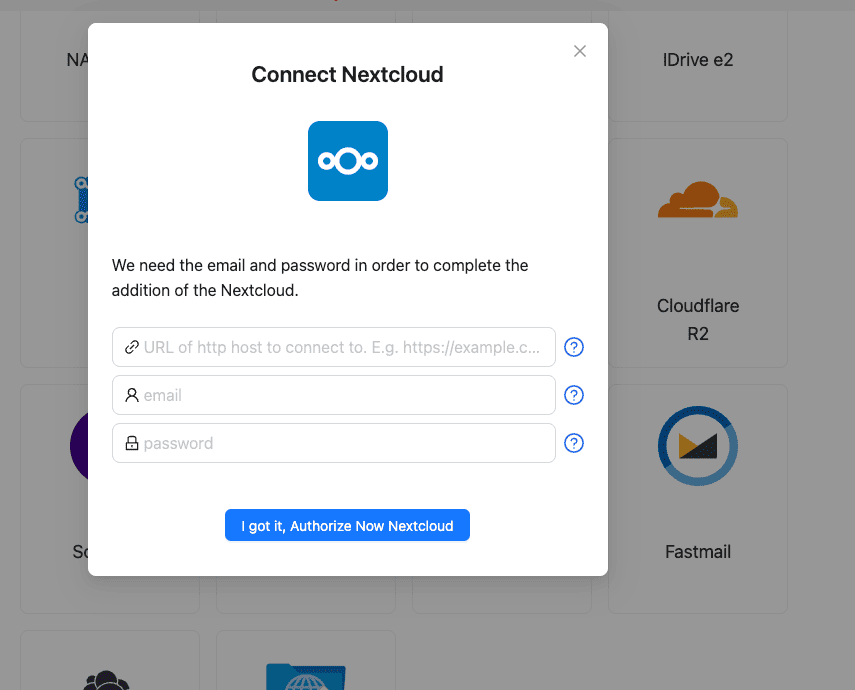
Click Add Cloud and choose Nextcloud, ownCloud or the generic WebDav tile. Paste the WebDAV address, enter your username, and use the app password if you created one.
Step 2: Connect Proton Drive
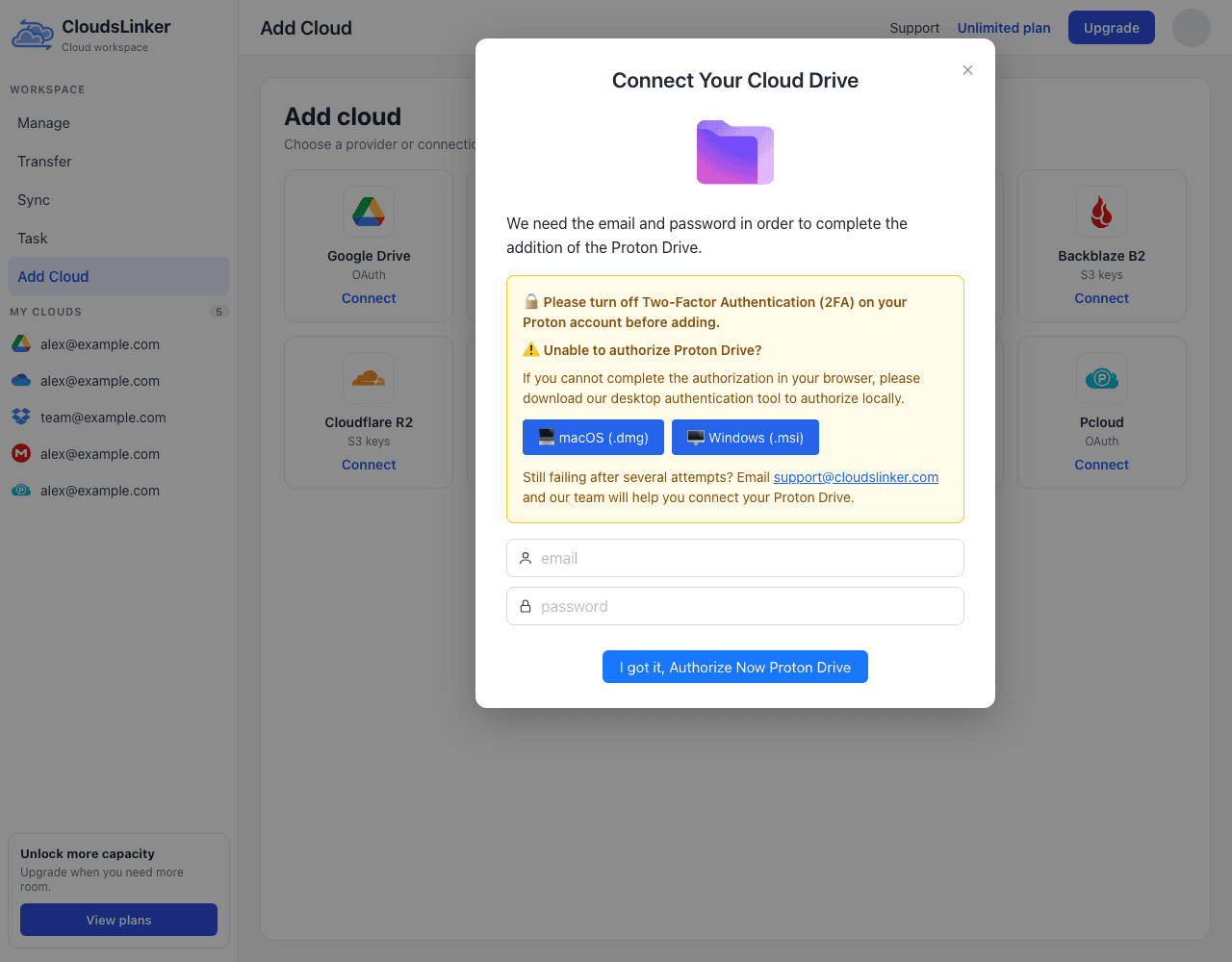
Turn off two-factor authentication in your Proton account settings — CloudsLinker signs in again from its servers during long transfers and has no way to enter a code. Then click Add Cloud, choose Proton Drive and enter your Proton email and password. The password is required because Proton uses it to unlock the keys that encrypt your files. If authorization does not finish in the browser, the dialog links a desktop authentication tool for macOS and Windows.
Step 3: Configure the Transfer
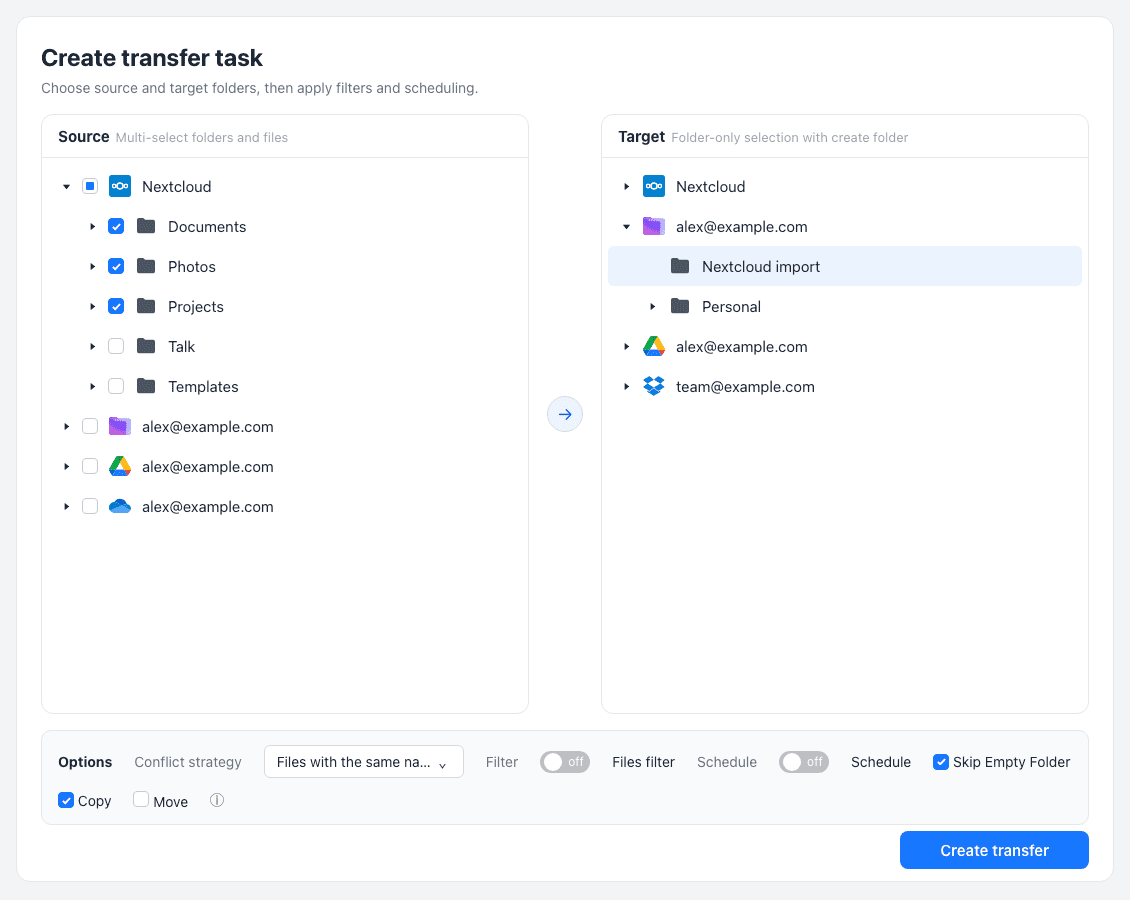
On Create transfer task, select the server's folders as the source and a Proton Drive
folder such as Nextcloud import as the target; the target side picks folders only and can
create a new one. Keep Copy so the server keeps its files until you have checked
Proton — Move deletes each file from the server after copying. A second run only
re-sends same-name files whose size differs or whose date is newer. Filters take file extensions or a size
range in MB, and Skip Empty Folder leaves out empty directories.
Step 4: Start and Monitor the Transfer
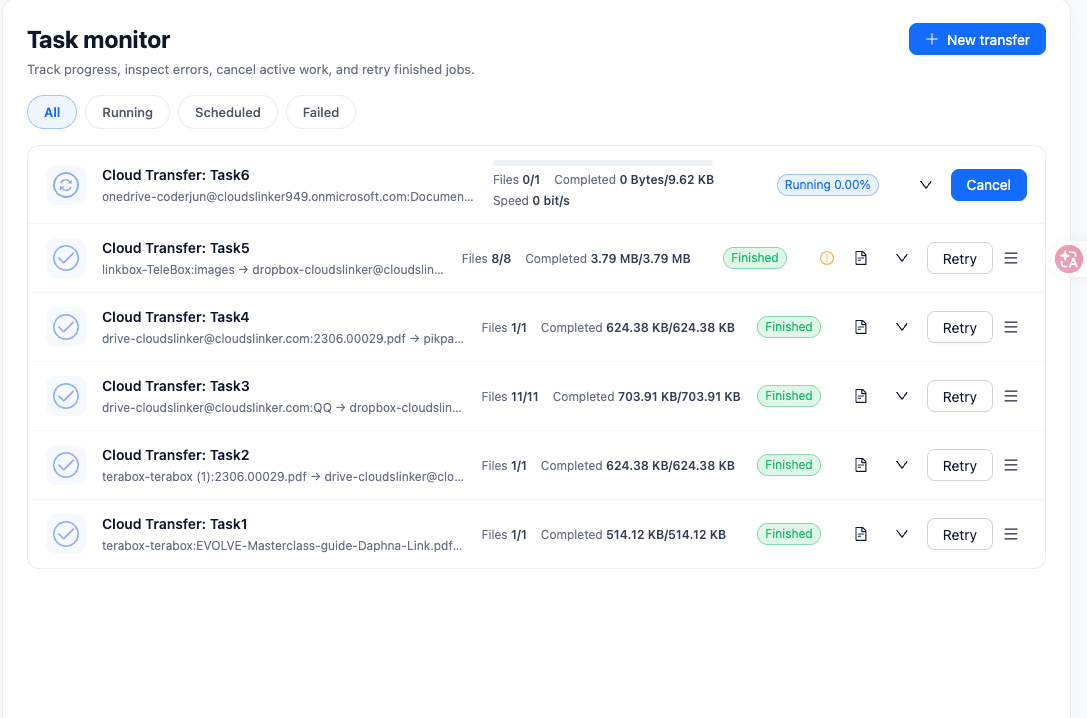
Click Create transfer and follow it in Task monitor, which has All, Running, Scheduled and Failed tabs and a Retry button for finished tasks.
Your Server Is Only on Your Home Network
This fits you if the server is reachable only on your LAN, through Tailscale or a VPN — or if you want to keep Proton's two-factor authentication switched on — and you use Windows or macOS.
Nothing on the internet can reach the server, so the copy has to run on a computer at home, with a local copy in the middle. You need free disk space for what you move.
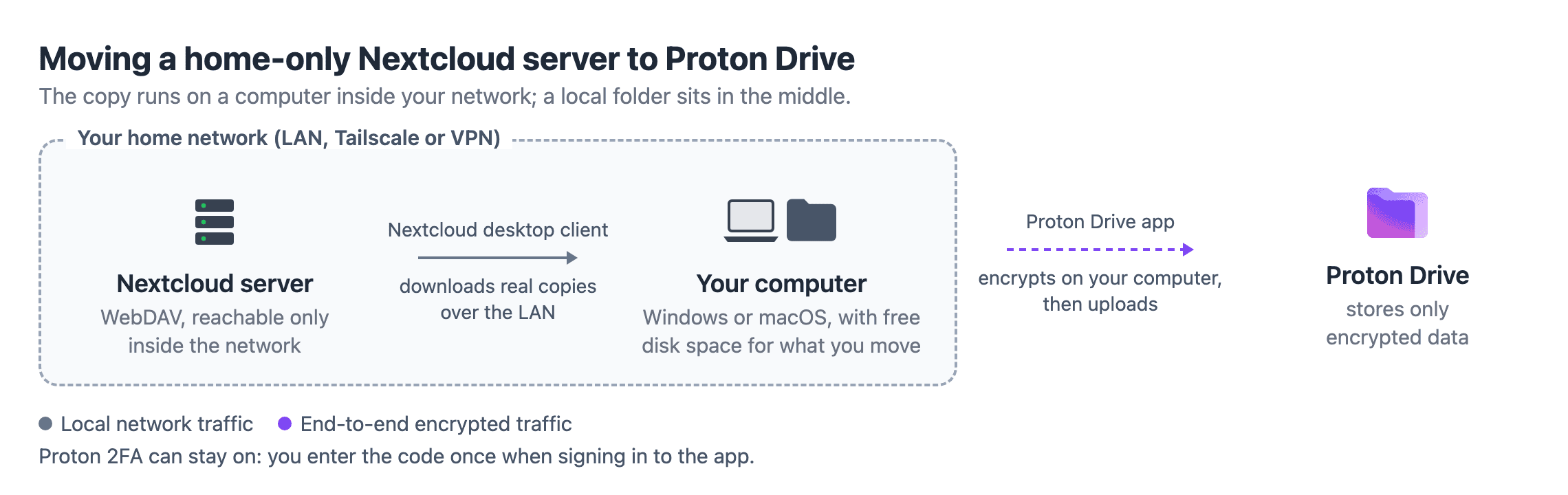
- Install the Nextcloud desktop client and connect your account. Turn off virtual files for the folders you plan to move, so you get real copies rather than placeholders. For ownCloud or another server, use its client or mount the WebDAV address in Finder or File Explorer.
- Install the Proton Drive app for Windows or macOS and sign in; it asks for your 2FA code once, like any login.
- Copy the synced folders into the Proton Drive folder. The app encrypts and uploads them in the background and retries failed uploads.
You're on Linux or Prefer a Terminal
This fits you if you run Linux — Proton announced a Linux desktop client in mid-2026 but has not released it — or you would rather script the copy, possibly from a machine inside your home network.
rclone has a WebDAV backend and, since v1.64, a
Proton Drive backend
that encrypts files the way Proton's apps do. It is documented as beta and built without an official
API, so start with one small folder. Run rclone config to add a webdav remote
(vendor nextcloud, owncloud or other) and a
protondrive remote; rclone asks for the 2FA code if the Proton account has one.
rclone copy nextcloud:Documents proton:Nextcloud-import/Documents --progress
rclone check nextcloud:Documents proton:Nextcloud-import/Documents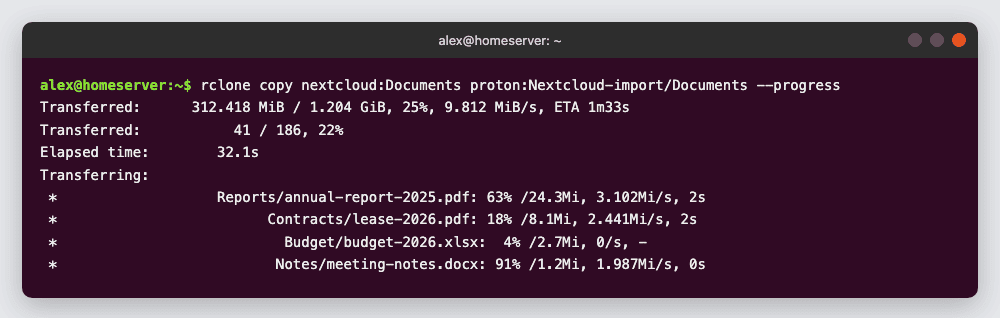
Run it once per top-level folder. Repeating the command skips files that already arrived, so an interrupted copy picks up where it stopped.
After the Move: What Changes Day to Day
| You used to… | With Proton Drive |
|---|---|
| Mount the server as a network drive over WebDAV | No WebDAV; on Windows and macOS the Proton Drive app syncs a local folder instead, and scripts that wrote to WebDAV need another target |
| Auto-upload phone photos with the Nextcloud app | Turn on photo backup in the Proton Drive mobile app and switch the Nextcloud upload off |
| Send Nextcloud share links | Create new share links in Proton Drive; the old links stop working when the server goes |
| Keep calendars and contacts on the same server | Proton Calendar and Proton Contacts, after importing the .ics and .vcf exports |
| Patch, back up and renew the server | Nothing to maintain — but keep the server, or a snapshot of its data directory, until you have opened files from every folder in Proton |
Finally, tidy up the access you opened for the migration: revoke the Nextcloud app password, remove the Proton connection from CloudsLinker, and turn Proton's two-factor authentication back on.
Frequently Asked Questions
https://cloud.example.com/remote.php/dav/files/USERNAME/. The USERNAME part is your Nextcloud user ID, which is not always your display name. ownCloud and other WebDAV servers show their own address in their settings or documentation.
Conclusion
If your server is only reachable at home or behind a VPN, use the desktop route: sync it down with the Nextcloud client and drop the files into the Proton Drive app on Windows or macOS. rclone handles the same job from a terminal, including on Linux, but its Proton Drive backend is still marked beta, so test a small folder first. For a server that is reachable from the internet, CloudsLinker copies straight from the WebDAV URL into Proton Drive without a local copy — remember to turn off Proton's two-factor authentication before connecting, and to export calendars and contacts separately.
Related: NAS to Proton Drive, iCloud Photos to Nextcloud, and the connection notes for Nextcloud, ownCloud and Proton Drive.
Online Storage Services Supported by CloudsLinker
Transfer data between over 58 cloud services with CloudsLinker

OneDrive

Google Drive

Google Photos

Shared Drive

OneDrive for Business

Dropbox

Box

Mega

pCloud

Yandex

ProtonDrive

AWS
GCS

iDrive
Storj

DigitalOcean

Wasabi
1fichier

PikPak

TeleBox

OpenDrive

Backblaze B2

Fastmail file
SharePoint

Nextcloud

ownCloud

Premiumize me

HiDrive

Put.io

Sugar Sync

Jottacloud

Seafile

Ftp

SFtp

NAS

WebDav

4shared

Icedrive

Cloudflare R2

Scaleway

Hetzner Object Storage

Synology C2 Object Storage

S3 Compatible

Doi

iCloud Drive

iCloud Photos

FileLU

Zoho WorkDrive

Telia Cloud / Sky

Drime

Filen

TeraBox

Internxt

Degoo

Gofile

Pixeldrain

Shade

Koofr
Didn' t find your cloud service? Be free to contact: [email protected]
Further Reading
Effortless FTP connect to google drive: Transfer Files in 3 Easy Ways
Learn More >
Google Photos to OneDrive: 3 Innovative Transfer Strategies
Learn More >
Google Photos to Proton Drive: 3 Effective Transfer Techniques
Learn More >